Visual Voicemail on Android can stop loading messages, refuse setup, miss notifications, or ask you to call voicemail instead. The fix usually comes down to setup, mobile data, the voicemail app, or a carrier account setting. These steps follow current Google, Samsung, AT&T, T-Mobile, and Verizon guidance.
Turn Visual Voicemail on in the Phone app
Start here when you use Phone by Google, because Visual Voicemail has its own switch.
Open the Phone app.
Tap More options.
Go to Settings then Voicemail.
Turn Visual voicemail on.
Phone by Google works on most Android devices running Android 9.0 or newer, but Visual Voicemail itself depends on your phone and carrier. On a dual-SIM phone, open Voicemail, tap each SIM, and turn Visual voicemail on for each line.
Finish carrier voicemail setup
A Visual Voicemail app cannot show messages correctly until the voicemail mailbox is active. On Phone by Google, use Phone > More options > Settings > Voicemail > Advanced Settings > Setup. Also check Advanced Settings > Service and choose Your carrier.
You can also call voicemail to confirm the mailbox works. Press and hold 1 on AT&T and T-Mobile, or dial *86 on Verizon, then follow the voice prompts. This does not repair the app screen by itself, but it confirms the voicemail service and lets you finish mailbox setup.
Use mobile data instead of Wi-Fi
Open Settings.
Go to Network & internet or Connections.
Turn Mobile data or Cellular data on.
Turn Wi-Fi off, then open Visual Voicemail again.
Carrier Visual Voicemail often needs the cellular network. Verizon says Android Visual Voicemail does not work on Wi-Fi and requires mobile data. AT&T says Visual Voicemail downloads over cellular data and its Android app does not work on a Wi-Fi-only connection. T-Mobile also tells Android users to turn off Wi-Fi during troubleshooting so the phone uses the T-Mobile network.
Tip: use Airplane Mode as a quick radio refresh. Turn Airplane Mode on, wait 10 seconds, turn it off, then test voicemail again.
Match the app to your carrier or phone
Use the voicemail app your carrier or phone maker supports. For Phone by Google, install or update Phone by Google from the Play Store, then return to the Visual Voicemail switch in the Phone app.
For T-Mobile, install or update T-Mobile Visual Voicemail. Open it the first time while connected to the T-Mobile cellular network, then follow the prompts.
For AT&T, install or update AT&T Visual Voicemail. Open the app and follow setup. When setup fails, check your account at att.com or in myAT&T to confirm the plan includes Visual Voicemail.
For Samsung Galaxy phones with a carrier Visual Voicemail app, open Visual Voicemail, tap Continue, allow the required permissions, tap Continue again, and finish the prompts. Samsung says the app name and icon can vary by carrier.
Google Fi users should use Fi voicemail settings in the Google Fi website or app, where voicemail access, PIN, and voicemail-by-text settings are managed.
Restart the phone and reset the voicemail app
A stuck voicemail app is common when messages will not play, the inbox will not refresh, or the app will not open. Restart the phone first. AT&T says to turn the phone off for 10 seconds and back on, and T-Mobile and Verizon also list restarting as a Visual Voicemail troubleshooting step.
Open Settings.
Tap Apps.
Select Phone, Voicemail, or Visual Voicemail.
Tap Force stop, then reopen the app.
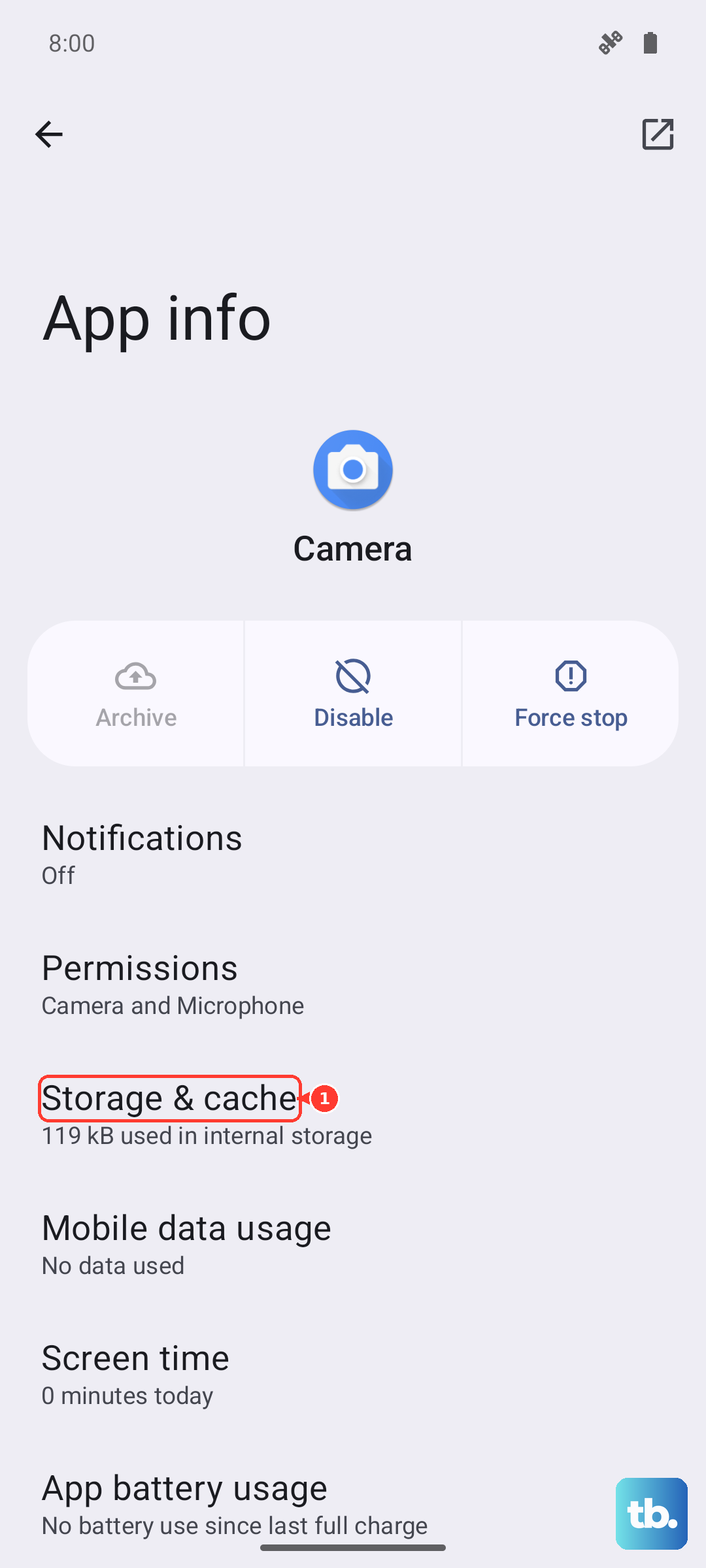
Return to the same app screen and open Storage or Storage & cache.
Tap Clear cache.
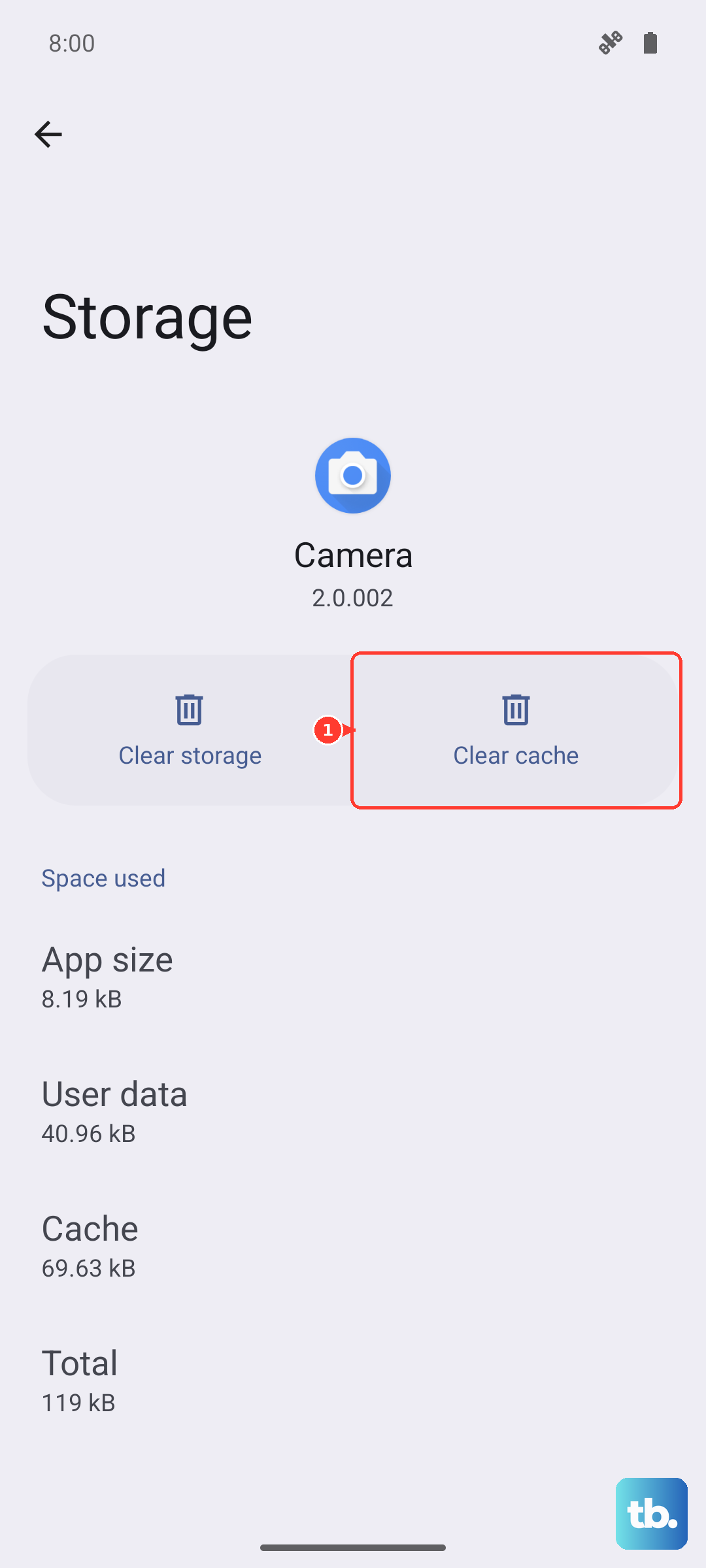
When the problem continues, tap Clear storage or Clear data. Save any recording you still need first. T-Mobile warns not to clear the voicemail app cache or data until you are on the latest app version, because clearing it deletes the voicemail messages held in the app.
On Samsung, use Settings > Apps > Voicemail > Storage > Clear cache, then Clear data > Delete. Samsung documents this for Visual Voicemail crashing or failing to open after a One UI 6.1 update.
Clear network blockers
Visual Voicemail needs working calling service and mobile data. Move to a place with coverage, confirm the phone shows a mobile data indicator, then place a test call. AT&T suggests calling 611 as a service test before calling voicemail.
VPN can also block Visual Voicemail. Open Settings > Network & internet > Advanced > VPN, tap the settings icon next to the VPN, and turn off Block connections without VPN. For a quick Verizon test, turn off the VPN and reopen Visual Voicemail.
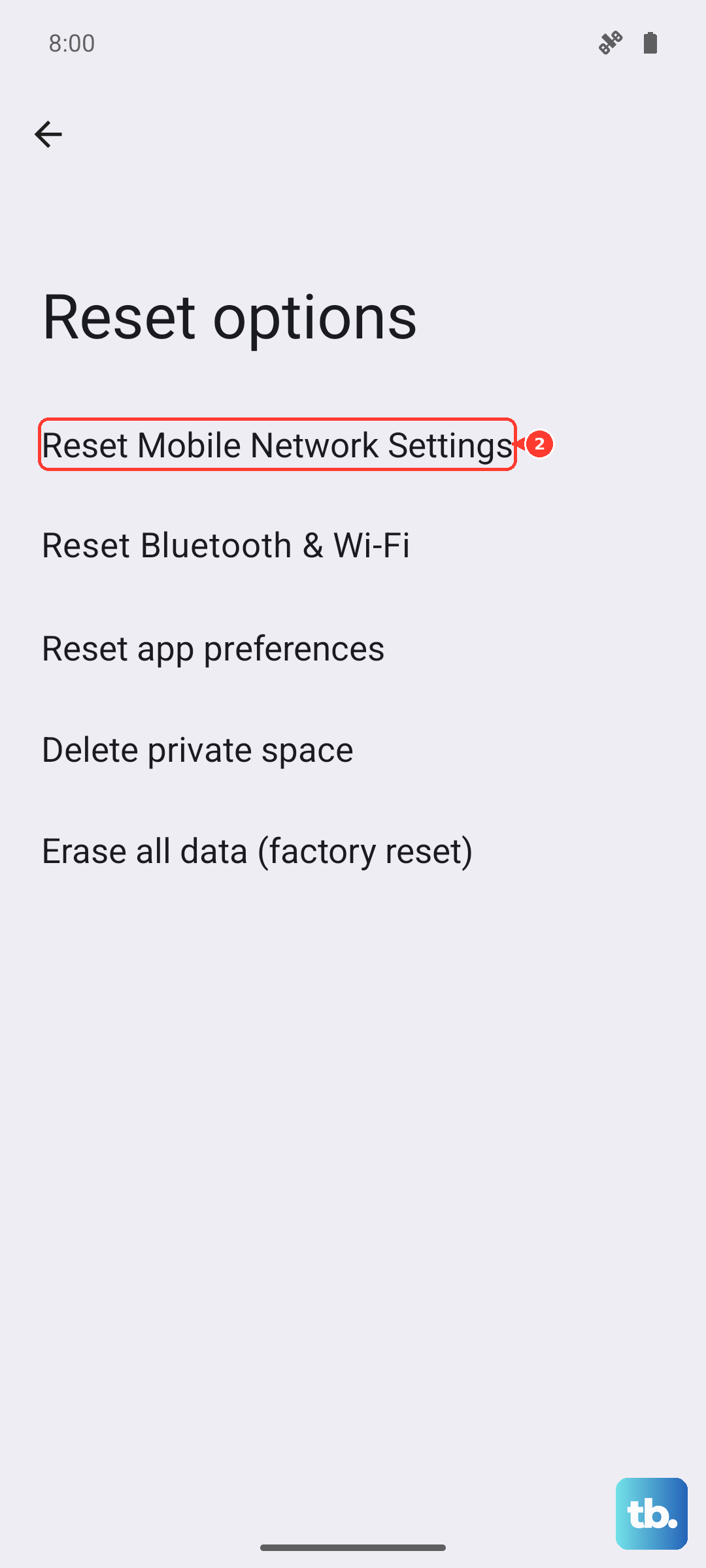
When the failure still looks tied to mobile data or network registration, reset network settings. On Pixel, go to Settings > System > Reset options > Reset Bluetooth & Wi-Fi > Reset settings. On Samsung, use Settings > General management > Reset > Reset mobile network settings > Reset settings > Reset.
Fix account and voicemail mailbox issues
Reset the voicemail PIN when Visual Voicemail cannot authenticate or asks for a password. AT&T lets you reset it online, T-Mobile supports dialing #793# for a temporary PIN by SMS, and Verizon provides a voicemail password reset flow.
Remove call forwarding that sends calls somewhere other than voicemail. Verizon uses *73, AT&T Wireless uses #21#, T-Mobile uses ##004# for busy, unreachable, and no-reply forwarding, and T-Mobile uses ##21# for unconditional forwarding.
Free mailbox space when callers cannot leave new messages. Verizon says a full mailbox must be cleared before callers can leave more messages. T-Mobile lets you press 7 to delete or 9 to save while listening.
Confirm the line includes Visual Voicemail. AT&T directs customers to check att.com or myAT&T; T-Mobile and Verizon voicemail features are also account or add-on dependent.
Do not mix carrier short codes. Use the code for your own wireless carrier only.
Update software and remove app conflicts
Install pending updates for Android and the voicemail app. On Pixel, use Settings > System > Software updates, then follow the on-screen instructions. Other Android phones may put it under Settings > About phone > Software update. On Samsung, use Settings > Software update.
For T-Mobile, uninstall the Visual Voicemail app and install it again when a voicemail will not play. For AT&T, reinstall from the official Play Store listing. Built-in carrier voicemail apps may not offer uninstall, so clear data or reset the app instead.
Downloaded battery-saver, calling, or voicemail-management apps can interfere with voicemail. Restart in Safe mode; when Visual Voicemail works there, remove recently downloaded apps one by one, then reinstall the ones you need.
Handle work phones and older advice
On a work or school phone, policy can block app network access, app permissions, or VPN behavior. Check Settings > Passwords and accounts for a Work tab. When the voicemail app is a work app and its icon is gray, the work profile may be paused. If an employer-managed VPN or device policy controls the setting, contact your admin.
Older Android voicemail guides often recommend broad fixes that are not supported in the current vendor research, such as clearing Carrier Services, manually changing APN values, dialing random forwarding codes from forum posts, or uninstalling Phone by Google updates as a general fix. Use the current carrier app, Phone by Google settings, cellular data checks, app reset, network reset, and carrier account fixes above instead.
Frequently Asked Questions
Why does Android Visual Voicemail work only after I turn off Wi-Fi?
Carrier Visual Voicemail can require cellular data. Verizon says Android Visual Voicemail does not work on Wi-Fi, AT&T says its app does not work on Wi-Fi-only, and T-Mobile recommends turning Wi-Fi off during troubleshooting.
Why is Voicemail transcription missing in Phone by Google?
Google says Voicemail transcription appears only where transcription is supported. If the setting is missing, make sure Visual voicemail is turned on first in Phone by Google.
Can I still listen to voicemail when Visual Voicemail is broken?
Yes. Press and hold 1 on AT&T or T-Mobile, or dial *86 on Verizon, then follow the voice prompts. T-Mobile also supports web voicemail for eligible lines.
Does Samsung Direct voicemail fix Visual Voicemail?
No. Samsung Direct voicemail is a separate Samsung voicemail surface on supported Galaxy phones running Android 16 with One UI 8.5 or higher. It does not repair carrier Visual Voicemail.