Outlook links stop opening when Outlook sends them to the wrong browser, Windows has broken web-link associations, a message is blocked, or Office needs repair. Start with the Outlook browser setting, then move through the platform and message-level fixes that match what you see on screen.
1. Set the Browser Outlook Uses
Start here when Outlook links open in Microsoft Edge instead of Chrome, Firefox, or your normal browser.
In new Outlook for Windows, open Settings > General > Files and links.
Under Open hyperlinks from Outlook in, choose System default browser or Microsoft Edge.
Close settings, return to the email, and open the link again.
In classic Outlook for Windows, open File > Options > Advanced > File and browser preferences > Open hyperlinks from Outlook in, then choose the browser you want.
2. Use the Edge Prompt When It Appears
Open a web link from Outlook.
When the Microsoft Edge banner appears, select Manage my settings.
Choose the system default browser experience.
Microsoft shows a first-run Edge banner for some Outlook and Teams links. Select Try Edge only when you want Outlook links to keep opening in Microsoft Edge.
3. Repair Windows Default Apps
Fix Windows itself when every app opens web links in the wrong place.
Open Start > Settings > Apps > Default apps.
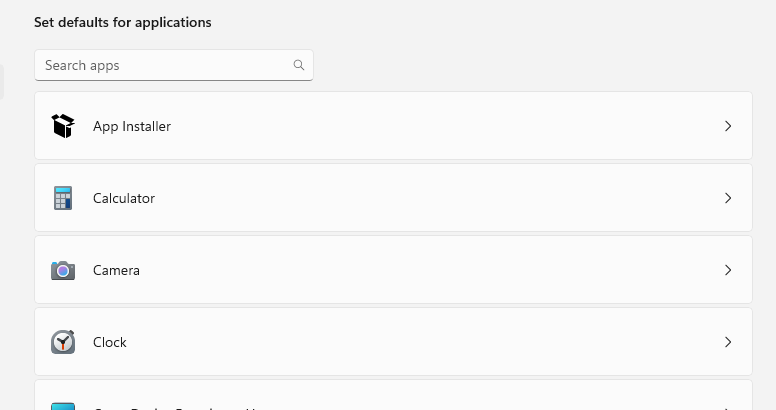
Under Set defaults for applications, select your browser.
Select Set default.
Open the individual HTTP and HTTPS entries and set them to the same browser.
Outlook's Open hyperlinks from Outlook in setting controls Outlook and Teams web links, so return to step 1 after fixing Windows default apps.
4. Choose the Browser on Mac and Mobile
On macOS Ventura 13 or later, open Apple menu > System Settings > Desktop & Dock > Default web browser, then choose your browser.
On earlier macOS versions, open Apple menu > System Preferences > General > Default web browser, then choose your browser.
Outlook for Mac follows the macOS default browser for normal web links. On iPhone or iPad, update iOS or iPadOS first, then open Settings > Apps > Default Apps, choose the browser feature, and select the browser app.
On Android, open Settings > Apps > Default apps > Browser app and select the browser you want. On some Android phones, open Choose default apps instead.
5. Save the Outlook Mobile Link Choice
Outlook Mobile also has its own link-opening choice on supported accounts.
Tap a link in an Outlook Mobile email.
Choose Microsoft Edge or your system default browser.
Turn on Remember my choice.
To change it later, open Outlook Mobile and go to Settings > Open Links With. Microsoft says Office 365 or Exchange email accounts in the app do not show this toggle.
6. Unblock Links in Junk Mail
In new Outlook for Windows, Outlook.com, or Outlook on the web, open Settings > Mail > Junk email.
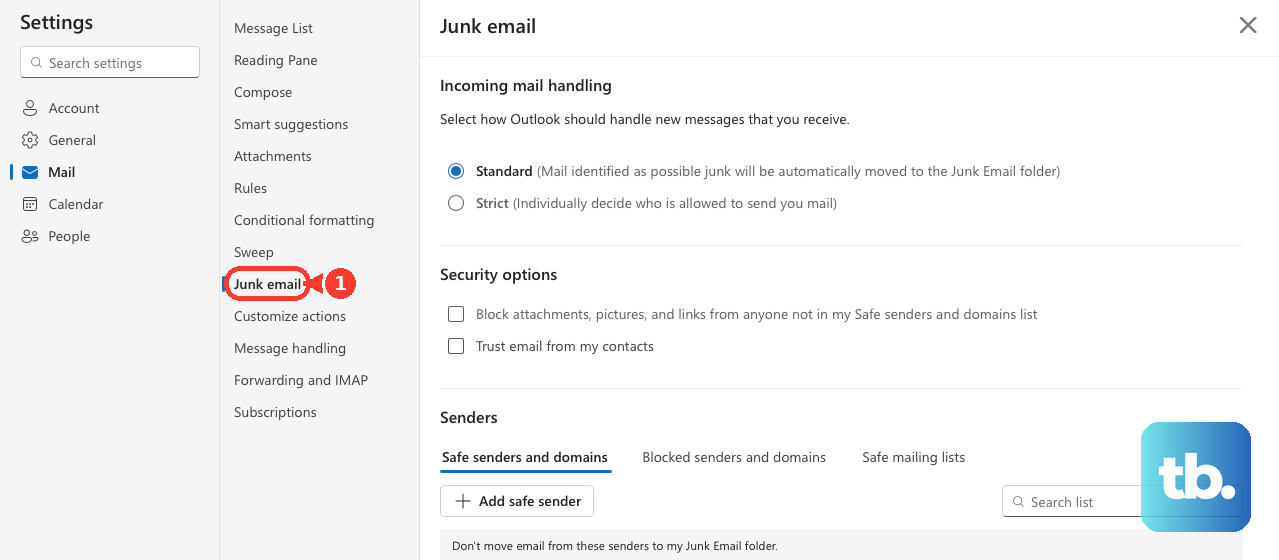
Under Security options, clear Block attachments, pictures, and links from anyone not in my Safe senders and domains list.
Select Save.
When links are disabled only in certain messages, Outlook's junk mail protection is the place to check. For a trusted sender, open Settings > Mail > Junk email > Safe senders and domains > Add safe sender, enter the email address or domain, select OK, then select Save.
In Outlook.com, open Junk Email, select the message, choose It's not junk, then select Show blocked content when you trust the message.
7. Fix Editing and Office File Links
Classic Outlook treats links differently while you are editing a message. Press Ctrl and click the link. To make a normal click open links while editing, go to File > Options > Mail > Editor Options > Advanced, then clear Use CTRL + Click to follow hyperlink.
When an InfoBar at the top of a classic Outlook message says links are disabled, select the button in that InfoBar to enable external content. When the message is plain text, links do not behave like clickable HTML links.
For Word, Excel, or PowerPoint links stored on OneDrive or SharePoint, open the app itself and go to File > Options > Advanced > File open preference, then choose Desktop or Browser. In classic Outlook, the same choice lives under File > Options > Advanced > File and browser preferences.
For one document link, right-click the URL, choose Open With, then pick the browser or desktop app.
Microsoft fixed this specific classic Outlook blank-or-error issue for OneDrive and SharePoint document links in 2026, so update Outlook first. If it still happens, copy the link, paste it into your browser address bar, and press Enter.
Open the same mailbox in Outlook on the web, then select the link there.
8. Update Office and Escalate Managed Blocks
- 1.Open Word or classic Outlook.
- 2.Go to File > Account or Office Account.
- 3.Under Product Information, select Update Options > Update Now.
- 4.If Update Now is missing, select Enable Updates first.
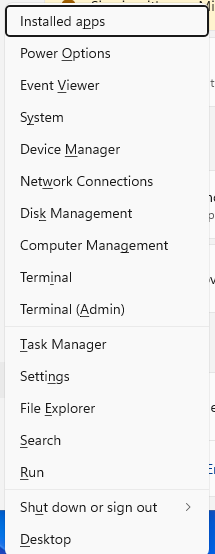
When the browser and message settings are correct, update Office before repairing it. On Windows 11, right-click Start, open Installed apps, select Microsoft 365 or Office, choose the ellipsis, then select Modify. For a Click-to-run install, choose Online Repair > Repair; for a volume-licensed MSI install, choose Repair > Continue instead. On Windows 10, right-click Start, open Apps and Features, select Microsoft 365 or Office, choose Modify, then select the repair option.
On a work or school PC, ask IT to check Choose which browser opens web links, Safe Links, and Trusted Sites rules. For trusted company FQDN, IP, UNC, or file links blocked by classic Outlook, IT can add the trusted path through Internet Options > Security > Trusted Sites > Sites or deploy it with Group Policy.
Frequently Asked Questions
Why do Outlook links open in Microsoft Edge instead of Chrome?
Outlook for Windows has its own browser setting. Set Open hyperlinks from Outlook in to System default browser, then set Chrome as the Windows default browser.
Why are links disabled only in some Outlook emails?
Outlook is blocking that message through Junk email security. Mark the message as not junk, show blocked content for a trusted message, or add the sender to Safe senders and domains.
How do I stop Outlook from opening email context in the Edge sidebar?
In Edge, open edge://settings/sidebar, select Outlook under App and notification settings, then turn off Automatically open Outlook email context in the side pane.
Should I reset Internet Explorer to fix Outlook links?
No. Internet Explorer reset instructions are legacy advice for old Outlook and Windows setups. Use Outlook browser preferences, Windows default apps, Office repair, or Microsoft’s current advanced registry steps for classic Outlook policy errors.