A missing Windows product key is frustrating because Windows may not have a full key for you to recover. Some PCs and purchases use a printed or stored key, while many Windows 11 and Windows 10 activations use a digital license instead. Start with how you got Windows, then use the matching path below.
Start where Windows came from
If Windows came preinstalled on a new Windows 11 or Windows 10 PC, check the device packaging, any included card, and the Certificate of Authenticity label attached to the PC. On some refurbished devices, the refurbisher must provide the key.
If you bought a boxed retail copy of Windows 11 or Windows 10 from an authorized retailer, open the Windows box and look for the product key on a label or card inside.
If you cannot find the packaging, card, or Certificate of Authenticity for a preinstalled copy, contact the hardware manufacturer.
Check your digital purchase records
For a digital copy bought from an authorized retailer other than Microsoft, search the email account used for the purchase for the Windows purchase confirmation email. If the retailer provides a digital locker, sign in to the retailer's website and open the digital locker for that Windows purchase.
For a digital copy bought from a Microsoft website or the Microsoft Store online, go to your Microsoft account Order history. Sign in with the Microsoft account used for the purchase, then locate the Windows order and its confirmation details.
Microsoft keeps product key records only for purchases from the Microsoft online store. A Windows 10 Pro or Windows 11 Pro upgrade bought in the Microsoft Store app uses a digital license instead of a product key, so check the confirmation email and the Microsoft account used for that upgrade.
Confirm whether Windows uses a digital license
Use Activation settings to see whether there is a product key to find at all.
- 1.On Windows 11, open Start > Settings > System > Activation.
- 2.On Windows 10, open Start > Settings > Update & Security > Activation.
- 3.Read Activation status.
- 4.If it says Windows is activated with a digital license or Windows is activated with a digital license linked to your Microsoft account, Windows is activated digitally instead of by a key you need to type in.
Reinstall Windows without entering a key
This fixes the reinstall screen that asks for a key on a PC that already has a digital license.
During Windows setup, select I don't have a product key.
Install the same Windows edition that was already activated on that device.
Connect the PC to the internet after setup finishes.
Sign in with the Microsoft account linked to the digital license.
Check activation in Windows 11 at Start > Settings > System > Activation, or in Windows 10 at Start > Settings > Update & Security > Activation.
Pull an embedded OEM key with PowerShell
Some Windows 11 and Windows 10 PCs store the original OEM product key in UEFI or BIOS firmware. PowerShell can display that key when it exists.
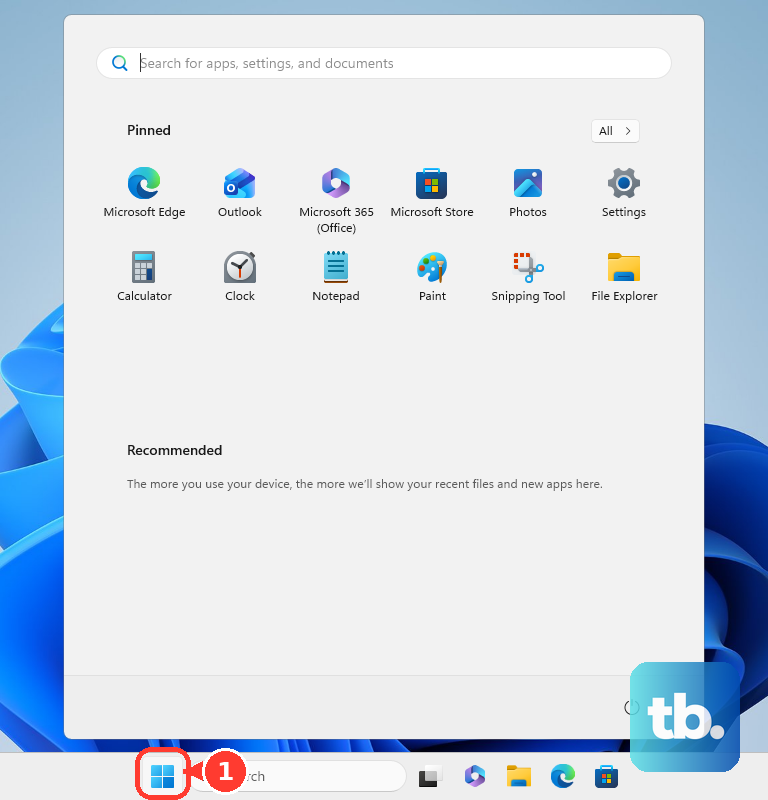
Open Start, search for PowerShell, choose Run as administrator, then run (Get-CimInstance -ClassName SoftwareLicensingService -Property OA3xOriginalProductKey).OA3xOriginalProductKey.
If PowerShell shows nothing, use your purchase records, packaging, Microsoft account order history, or digital license status instead.
Read key tools without chasing the wrong number
The most common cause of confusion is that key-viewer tools can show an installed key that is not the full reusable product key you expected.
Open Microsoft Store, search for ShowKeyPlus, select ShowKeyPlus, select Get, then select Open. ShowKeyPlus is listed for Windows 10 version 17763.0 or higher.
Review the Installed key and OEM key fields. Treat a generic installed key as not a reusable personal key. On a consumer PC it is a placeholder that only works alongside a digital license. On a work or school PC it may instead be a Generic Volume License Key that activates against your organization's KMS host, so confirm the licensing channel before acting on it.
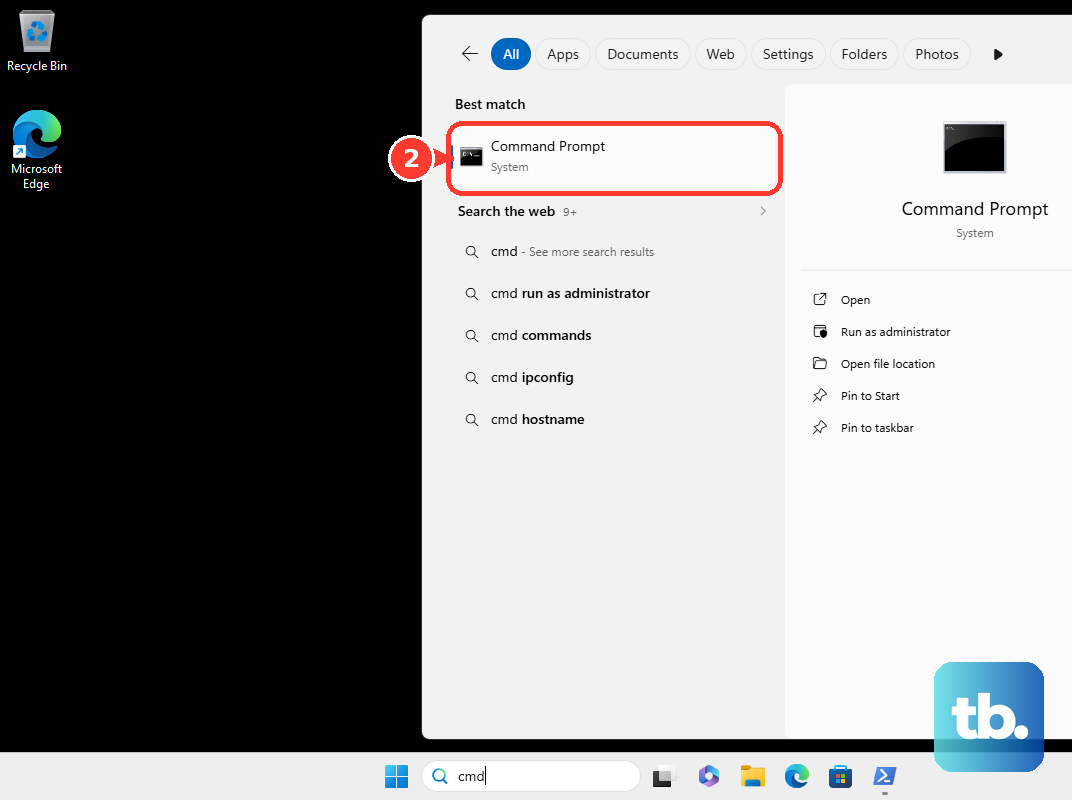
Open Command Prompt and run slmgr.vbs /dli to view license information and a partial product key. Run slmgr.vbs /dlv for detailed license information, and use the partial key only to match Windows to a key already in your records.
Skip old WMIC advice on current Windows 11
Open Command Prompt only for Slmgr license information, not for the old WMIC recovery command.
Do not use wmic path softwarelicensingservice get OA3xOriginalProductKey as the current Windows 11 method.
Use PowerShell and the Get-CimInstance command above for current Windows 11 PCs.
For Windows 7 or Windows 8.1, check the label or card inside the Windows box, or check the sticker on a PC that came with Windows preinstalled.
Contact the manufacturer if that older preinstalled key is lost.
Keep any key you recover with your purchase records.
Use admin portals for work or school keys
Work, school, and other managed devices use licensing paths that differ from a personal retail PC. If your Windows copy belongs to an organization, ask the person who manages licensing before trying to reuse or move a key.
Organizations with volume licensing access use the Microsoft 365 admin center through Billing > Your products > Volume licensing > View downloads and keys. An authorized admin can open the product, go to Keys, then use Copy key to clipboard or Export selected keys to CSV.
Perpetual software bought through the Cloud Solution Provider program is also handled in the Microsoft 365 admin center through Billing > Your products. On the product's Downloads & keys area, an authorized customer admin chooses Product version, Language, and CPU & file type, then uses Copy key to clipboard and Copy.
Frequently Asked Questions
Can I find my Windows product key in Settings?
Settings can show whether Windows is activated with a digital license, but it does not display the full Windows product key for ordinary consumer digital licenses.
Why does PowerShell show a blank result?
A blank result means Windows did not find an OEM product key embedded in the PC firmware. Use your purchase email, packaging, Microsoft account order history, or digital license status instead.
Is a digital license the same as a product key?
No. A digital license activates Windows without requiring you to enter a product key, including eligible upgrades and many Microsoft Store purchases.
Can Slmgr show my full 25-character Windows product key?
No. Slmgr shows license information and a partial product key, which is useful only for matching Windows to a key you already have.