
Factory resetting your Tecno Spark 30 Pro is a powerful way to wipe it clean. It's the most complete fix for stubborn software problems, and it's essential if you're passing the phone on to someone else. The process returns the phone to exactly how it was when you first took it out of the box.
Back Up Everything Before You Start
This step is non-negotiable. A factory reset will permanently delete all your photos, messages, apps, and files from the phone's internal storage. Your first stop should be Settings > Google > Backup. Make sure backup is turned on for your Google account and tap Back up now to sync your app data, call history, and device settings.
Double-check your photos and videos. Open the Google Photos app and ensure they are all backed up to the cloud. Anything not backed up will be lost forever once you proceed.
Remove Your Google Account
This is a critical step to avoid Factory Reset Protection (FRP) lock, which would prevent the next user from setting up the phone. Go to Settings > Passwords & accounts. Tap on your Google account and select Remove account. Confirm you want to remove it. I'd do this right after backing up to make sure you don't forget.
Perform the Reset from Settings
This is the standard method when your phone is working. On your Tecno Spark 30 Pro, navigate to Settings > System > Reset options. Here, you'll see several choices. Tap on Erase all data (factory reset).
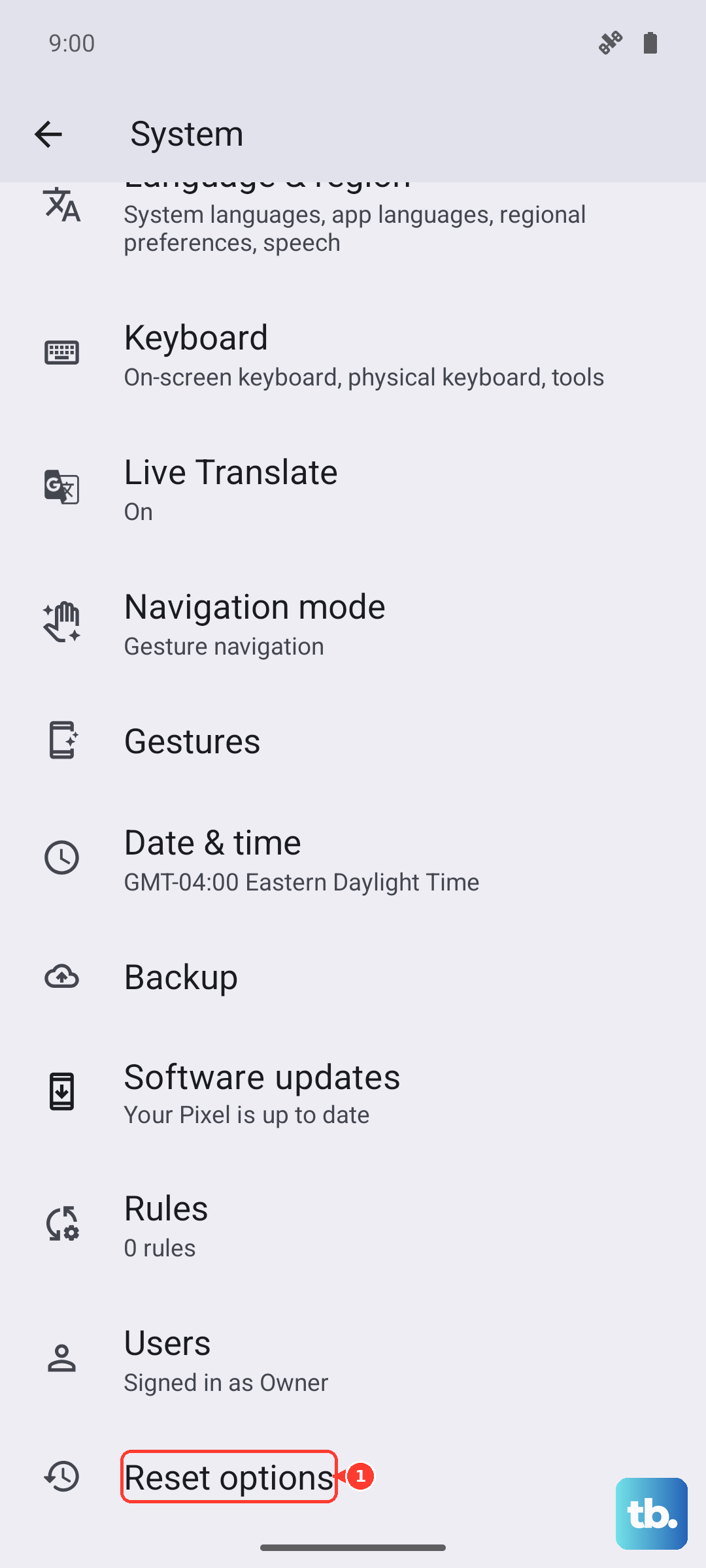
The phone will show you a final screen listing everything that will be deleted. If you're sure, tap Erase all data. You'll need to enter your PIN, pattern, or password to confirm. The phone will then restart and begin the wiping process, which takes a few minutes.
Use Recovery Mode if the Phone is Frozen
If your Spark 30 Pro won't turn on properly or is stuck, you can force a reset using the physical buttons. First, power the phone off completely. Once it's off, press and hold the Power button and the Volume Down button together.
Keep holding them for about 10 seconds until you feel a vibration and see the Tecno or Android logo. This boots you into recovery mode. Use the Volume buttons to scroll to the Wipe data/factory reset option and press the Power button to select it. Confirm your choice on the next screen. When it's done, select Reboot system now.
Try a Less Drastic Reset First
Before doing a full wipe, consider the other options in the Settings > System > Reset options menu. Reset Wi-Fi, mobile & Bluetooth can fix connection problems. Reset app preferences resets all your app permissions and default apps without deleting any data, which can solve issues with apps crashing or not opening.
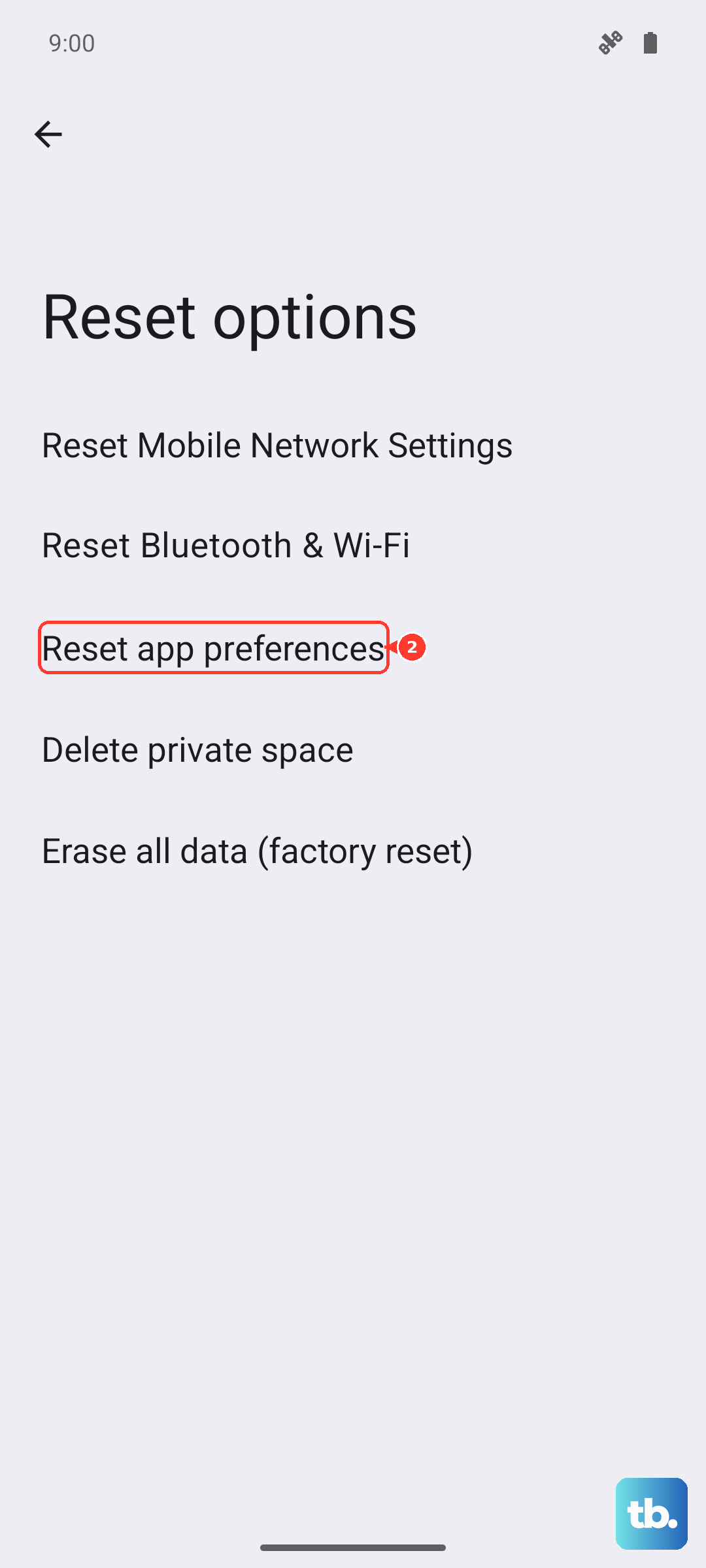
These targeted resets often clear up minor glitches and are a great first step if your main issue is with connectivity or a specific app.
Setting Up Your Phone Again
After the reset, you'll be greeted with the initial setup screen. Follow the prompts to select your language and connect to Wi-Fi. When you sign back into your Google account, you'll be given the option to restore your data from the backup you made earlier.
This will reinstall your apps and bring back your settings. Since the Spark 30 Pro runs HiOS, you may also see prompts to set up Tecno's own services. This is also a good opportunity to uninstall or disable any pre-installed apps you don't plan to use.
When a Factory Reset Makes Sense
On a phone like the Spark 30 Pro, a reset can be a great way to combat the lag that can build up over time, especially with the Helio G100 processor. It's the definitive fix for persistent app crashes, mysterious battery drain, or if you suspect software corruption.
It's also the only way to truly ensure all your personal data is removed before you sell or give away the phone. For simpler issues, always try restarting the phone or clearing the cache for specific apps first.