AMD chipset drivers keep Windows working properly with your Ryzen platform, motherboard chipset, and related system devices. If you just built a PC, reinstalled Windows, changed hardware, or skipped driver updates for months, start with the official AMD package.
Use the paths below in order: AMD first, Auto-Detect when you want the simplest route, then Windows Update or your PC maker when your system is OEM-managed.
Start with AMD's official chipset download
The most direct route is AMD's Drivers and Support page. Open AMD's driver page, use the product selector to choose your AMD chipset, then select Submit.
On the download page, choose your operating system, expand AMD Chipset Drivers, and select Download. AMD's current X870E page lists AMD Ryzen chipset package 8.08.12.551, released August 14, 2026, for Windows 10 and Windows 11 64-bit on supported Ryzen and Threadripper platforms.
If the AMD product selector does not match your system or the page does not offer the right package, use Download Windows Drivers for AMD Auto-Detect next, or get the chipset driver from your PC or motherboard maker.
Use AMD Auto Detect for a simpler path
AMD Auto-Detect works on Windows 11 version 21H2 and later, plus Windows 10 64-bit version 1809 and later. It supports compatible AMD Radeon Series Graphics and AMD Ryzen Chipsets.
Open AMD's Drivers and Support page and select Download Windows Drivers. After the file downloads, open the save folder and double-click the downloaded file.
Select Install, then let AMD Software Installer check hardware compatibility and obtain the latest driver versions. When newer drivers or software are offered, choose the package and options shown, select Accept & Install, and finish with Close.
At the end of the Auto-Detect flow, AMD Software can show Launch AMD Software: Adrenalin Edition and an automatic update option. Those options vary by system configuration, so treat them as part of the Auto-Detect software flow rather than a separate chipset-only switch.
Install the AMD Chipset Software package
Find the chipset driver package you downloaded from AMD, then double-click the AMD Chipset Software executable file. Wait for extraction to finish and for AMD Chipset Software Installer to open.
Leave the supported drivers checked unless you have a specific reason to change the selection. Select AMD Chipset Driver End Under License Agreement if you want to review the terms. Then select Install and wait for the installation to finish.
Select Close and reboot when prompted. You need administrator rights to install AMD Ryzen chipset drivers on Windows.
Check Windows Update for driver updates
This fixes missing recommended driver updates when AMD, Microsoft, or your PC maker publishes an applicable package through Windows Update. On Windows 11, open Start.
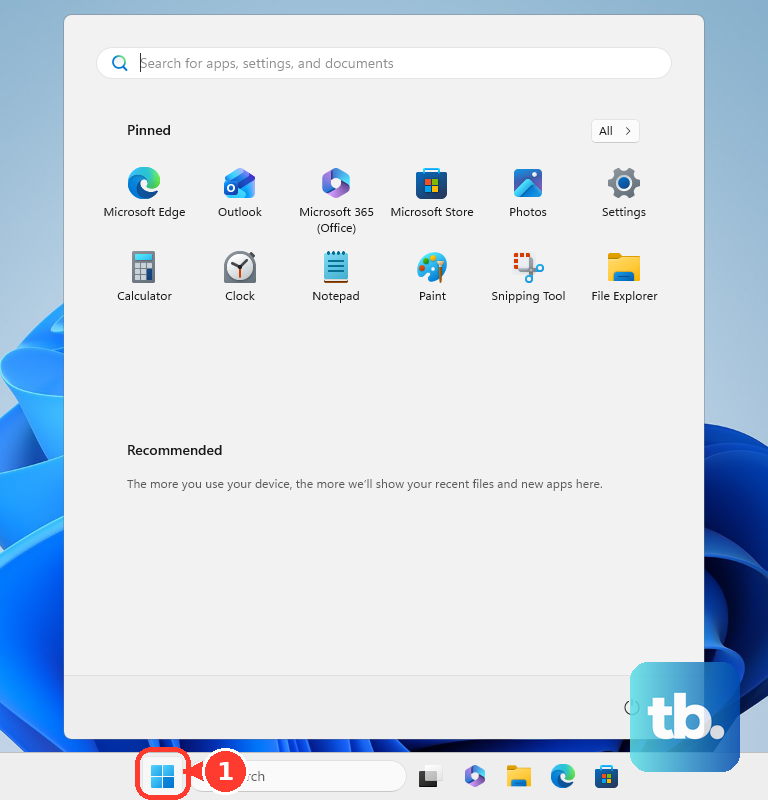
Open Settings, then open Windows Update. Select Check for updates to install recommended updates Windows offers automatically.
Next, open Advanced options and turn on Receive updates for other Microsoft products. Open Optional updates under Additional options.
Select the listed driver updates you want, then choose Download and install. Restart from Start, Shutdown or sign out, then Restart.
Windows 10 still has a documented driver-update path through Settings, Update & Security, and Windows Update, but Microsoft support for Windows 10 ended on October 14, 2025.
Use your PC maker's driver tools
This route applies to OEM desktops, laptops, and some system-builder PCs with customized motherboards. AMD says systems from makers such as Dell, HP, and Lenovo normally get BIOS updates, driver and software support, and warranty service through the system manufacturer.
For a Dell PC, search the Start menu for SupportAssist, open it, go to Home, choose Update software, select Start, and follow the prompts.
You can also open Dell Drivers & Downloads, choose Check for updates under Automatic Updates, or enter the Service Tag, Express Service Code, or model number and download a listed Chipset driver.
For an HP PC, open HP Support Assistant, go to My Dashboard, choose your computer, open Updates, wait for the analysis, then select the available updates to download and install.
You can also use HP's Software and Drivers website, identify the HP product, choose the operating system when prompted, download the listed package, and run the installer.
For a Lenovo PC, open Lenovo Vantage, go to System Update, choose Check for Updates, and install all or selected updates.
Lenovo's support site also offers Drivers & Software, with Automatic Update and Manual Update paths for model-specific drivers.
Fix a chipset reinstall that will not proceed
The most common documented cause is AMD Chipset Software Installer stopping because required installer files are missing. Download and install the latest AMD Ryzen chipset drivers from AMD.com first. Once that install or update succeeds, keep using the latest drivers or uninstall the AMD Ryzen chipset package through the supported Windows path.
To uninstall when it is actually needed, open Control Panel, then open Programs and Features. Double-click AMD Chipset Software.
Leave the selected components checked when AMD Chipset Software Installer lists the drivers to be removed. Choose Uninstall and wait for the uninstall to finish. Then select Finish.
AMD recommends uninstalling only when your hardware configuration changed or the installed chipset drivers are extremely outdated. Do not remove Ryzen chipset components through Device Manager or third-party driver removal tools; AMD Cleanup Utility removes AMD graphics and audio software, not AMD chipset drivers on AMD-powered systems.
Roll back only one problem driver
Right-click Start and open Device Manager. Expand the relevant device category, then right-click the device and select Properties.
Open the Driver tab and select Roll Back Driver. Choose a reason, then select Yes.
Restart if Windows prompts you. This is a recovery option for an individual device driver, not a full rollback of the AMD chipset package.
Use advanced manual sources only when needed
Microsoft Update Catalog is for advanced Windows users who need AMD chipset-related drivers published through Microsoft's catalog. Open Microsoft Update Catalog, search with a precise AMD system driver name plus the version or hardware name, choose the matching update, select Download, and save the package.
Catalog entries can be generic component drivers rather than the full AMD chipset installer. Use AMD's package installer for normal consumer updates.
Device Manager's Update driver, Search automatically for updated driver software, and Browse my computer for drivers paths fit individual devices, not the complete AMD Ryzen chipset package.
If these advanced routes do not solve the issue, return to the current AMD chipset package or use your PC maker's exact model support page.
Handle managed work devices
This applies when your PC is owned or controlled by an employer, school, or IT department. Driver updates can be approved and delivered through Microsoft Intune, Windows Autopatch, Windows Update, or the manufacturer's business tools.
Do not force a consumer chipset installer onto a managed PC without permission. Use the company software portal or contact IT so the AMD or OEM chipset driver can be deployed through the channel they manage.
Frequently Asked Questions
Do AMD chipset drivers update automatically?
Recommended hardware drivers can install automatically through Windows Update when AMD, Microsoft, or your PC maker publishes them there. AMD Auto-Detect can also offer automatic update options after installation, with available options depending on system configuration.
Should I use AMD.com or my PC maker's website?
Use AMD.com for AMD-powered retail motherboards with chipset drivers listed by AMD. Use Dell, HP, Lenovo, or your system maker's support page for OEM PCs or customized motherboards.
Can I update AMD chipset drivers in Device Manager?
Device Manager can update an individual device driver when Windows finds a match. AMD's chipset software installer is the vendor-documented route for the full AMD Ryzen chipset package.
Do I need to uninstall old AMD chipset drivers first?
Usually no. AMD recommends uninstalling only when your hardware configuration changed or the installed chipset drivers are extremely outdated, and the supported uninstall path is Control Panel > Programs and Features > AMD Chipset Software.