
"My Cricket SIM activated fine, but I can't send pictures and my data is acting weird. Why?"
This usually traces back to one missing or misconfigured APN field. Cricket Wireless uses a specific APN named Endo, with its own MMS server, and getting any of the values wrong is enough to break MMS while data still half-works.
Here is the verified configuration from Cricket's own setup documentation, plus the order to try things in when something refuses to work.
What Changed Recently
- Cricket Wireless is owned by AT&T and uses AT&T's network and bands. The APN is unique to Cricket, not shared with AT&T's main brand, even though the underlying towers are the same.
- The APN name is Endo. That is not a typo; it is the actual value Cricket assigns. The MMS server is at mmsc.aiowireless.net (a legacy address from Aio Wireless, which AT&T merged into Cricket years ago).
- Cricket uses one APN for both 4G LTE and 5G. There is no separate 5G APN, and the same Endo value covers all current Cricket phones.
- iOS updates occasionally reset Cricket's APN back to AT&T defaults. After any major iOS update, check the APN screen and re-enter Cricket's values if needed.
Getting to the APN Screen
If MMS is the only thing broken, double-check the MMSC, MMS Proxy, and MMS Port values. If data is also broken, the APN itself (the Endo value) is the likely culprit. Confirm spelling and capitalization in either case.
Android
- 1.Open Settings
- 2.Tap Network & Internet (or Connections on Samsung)
- 3.Tap Mobile Networks
- 4.Tap Access Point Names
- 5.Tap the menu (three dots), then New APN or edit the existing one
- 6.Enter every value from the Android list below
- 7.Tap Save, then select the new APN to make it active
- 8.Restart the phone or toggle Airplane Mode for 20 seconds to apply
iPhone and iPad
- 1.Open Settings
- 2.Tap Cellular or Mobile Data
- 3.Tap Cellular Data Options
- 4.Tap Cellular Network (some iOS versions list this as Cellular Data Network)
- 5.Enter values from the iPhone list below
- 6.If you do not see the Cellular Network option, run Reset Network Settings and check for a carrier settings update
Cricket Android APN Values
Use these for Android phones, tablets, hotspots, and smartwatches connected through a Cricket SIM:
- Name: Internet
- APN:
Endo - Proxy: <Not set>
- Port: <Not set>
- Username: <Not set>
- Password: <Not set>
- Server: <Not set>
- MMSC:
http://mmsc.aiowireless.net - MMS proxy:
proxy.aiowireless.net - MMS port: 80
- MCC: 310
- MNC: 150
- Authentication Type: None (or <Not set>)
- APN Type:
default,mms,fota,hipri,supl - APN Protocol: IPv4
- APN Roaming Protocol: IPv4
- Turn APN On: Yes (toggle to ON)
- Bearer: Unspecified
Cricket iPhone APN Values
iPhones running iOS 15 or later usually auto-configure these from Cricket's carrier profile. If you need to enter them manually:
- Cellular Data (APN):
Endo - Username: <Not set>
- Password: <Not set>
- MMS:
- APN:
Endo - Username: <Not set>
- Password: <Not set>
- MMSC:
http://mmsc.aiowireless.net - MMS Proxy:
proxy.aiowireless.net - MMS Max Message Size: 1048576
- MMS UA Prof URL:
http://www.apple.com/mms/uaprof.rdf
- APN:
- Personal Hotspot: APN =
Endo, Username and Password = <Not set>
Quick Setup via Carrier Profile Reset
Cricket pushes a carrier configuration profile to most Android phones and all iPhones during activation. If you are on a phone Cricket recognizes, you usually never need to type any of these values; the network sends them down automatically when the SIM activates.
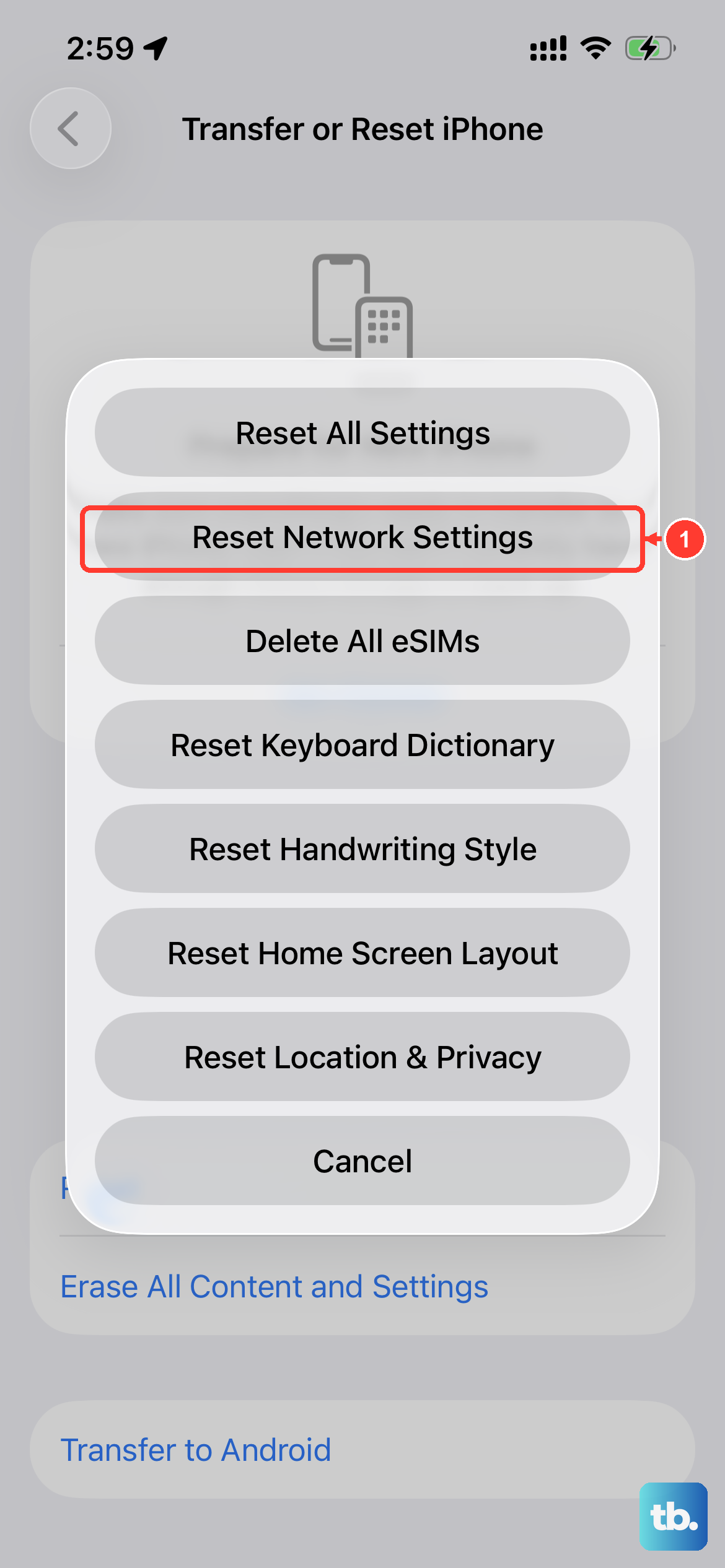
If you suspect you are missing the profile, the quickest fix is a fresh Reset Network Settings followed by a reboot. On iPhone, go to Settings > General > Transfer or Reset iPhone > Reset > Reset Network Settings. On Android, the equivalent lives under Settings > General management > Reset > Reset network settings or similar (path varies by manufacturer). After the reboot, give it five to ten minutes connected to Wi-Fi for the profile to install in the background.
Cricket Connection Fixes
- After saving the APN, reboot the phone. Cricket's APN refuses to switch to active on some Android phones unless you cycle power.
- Confirm the APN type string exactly:
default,mms,fota,hipri,supl, no spaces. The order does not matter, but every item does. Missingmmskills picture messaging; missinghiprikills tethering speed on some phones. - Check that Turn APN On shows ON. Some Android versions create the entry but leave it disabled.
- If MMS still fails, double-check the MMS Proxy value. Cricket uses
proxy.aiowireless.net, not the bare IP that other carriers use. Typo here is the single most common reason MMS keeps failing on Cricket. - For iPhones, install any pending Carrier Settings update at Settings > General > About. A prompt appears within 15 seconds if one is available.
- If your phone shipped from AT&T and you switched to Cricket, request an unlock from AT&T before troubleshooting further. Locked AT&T phones sometimes refuse Cricket's profile entirely.
- Cricket-network MMS does not work if you are roaming on a partner network. If you are travelling, switch back to a Cricket coverage area or use Wi-Fi messaging.
Frequently Asked Questions
Why is the APN value "Endo" and not "Cricket"?
The Endo name traces back to Aio Wireless, an AT&T-owned prepaid brand that merged into Cricket Wireless. The back-end identifier survived the merger and remains the active APN. It is not a customization or a placeholder; it is the literal value Cricket's network expects.
Is Cricket's network the same as AT&T's?
Yes, in terms of coverage and bands. Cricket uses AT&T's full LTE and 5G footprint. There are no exclusive Cricket bands and no Cricket-only towers. The difference is at the billing and provisioning layer, not the radio layer.
Do I need a different APN for 5G on Cricket?
No. The same Endo APN handles 4G LTE and 5G. To pull 5G specifically, make sure 5G is enabled in your phone's network mode and your plan includes 5G access (most current Cricket plans do).
My MMS works but data is slow. What's wrong?
Slow data with working MMS usually means the APN type string is missing hipri or the phone is throttling for plan reasons. Check the APN type field and confirm the full string default,mms,fota,hipri,supl is present. If that looks right, check your plan's data cap; many Cricket plans throttle after a soft cap.
The APN screen is grayed out on my iPhone. Why?
An iPhone with a carrier-locked status from another network often shows the APN as read-only or hides it entirely. The fix is to confirm the iPhone is fully unlocked, then run Reset Network Settings to pull a fresh carrier profile from Cricket.
Can I use these APN settings on a Cricket-branded prepaid SIM and a postpaid AT&T SIM in the same dual-SIM phone?
Yes. Each SIM gets its own APN profile. Configure the Cricket APN under the Cricket SIM's settings and let AT&T's auto-profile handle the AT&T SIM. The two do not interfere with each other.
What does the MMS Max Message Size 1048576 mean?
It is the maximum MMS attachment size in bytes, which works out to exactly 1 MB. Cricket follows the standard US-carrier MMS limit. For larger files, use iMessage or Wi-Fi-based messaging.