If your mobile data stopped working or picture messages will not send, the cause is often a wrong or missing APN. The Access Point Name is the gateway that tells your phone how to reach your carrier's data and multimedia network, and a single wrong character can leave you with bars but no internet.
This guide gives you the current 2026 APN values for AT&T, Verizon, T-Mobile and the MVNOs people actually use, plus the exact steps to enter them on Android and iPhone. Every value here is the one carriers publish today, and we have dropped the dead networks that older guides still list.
When You Need to Change Your APN
Most phones configure the APN automatically the moment you insert a SIM or activate an eSIM. The carrier pushes a profile in the background, so you usually never touch these settings.
You only need to enter an APN by hand when something breaks or changes. The common triggers are an unlocked or imported phone that did not pick up the right profile, a switch from one carrier to another, an MVNO SIM that uses a custom value, or data and MMS that simply stopped after an update.
If your data and texts already work, leave the APN alone. Editing a profile that is fine is the fastest way to break a connection that was working.
How to Change APN Settings on Android
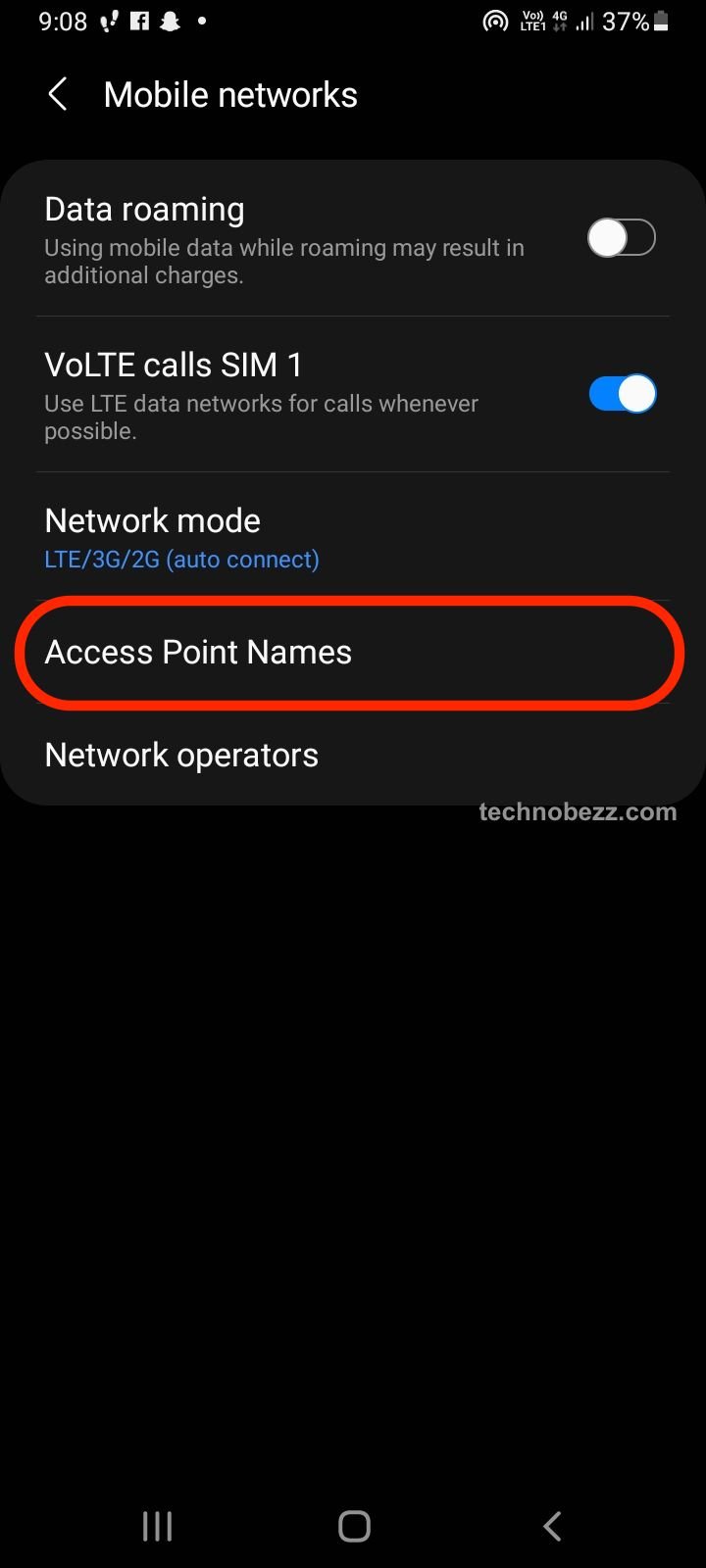
The wording varies slightly by brand, but the path is similar across modern Android phones. On most devices go to Settings > Network & internet > SIMs, then tap your line and open Access Point Names. On Samsung Galaxy phones the path is Settings > Connections > Mobile networks > Access Point Names.
To add a new one, tap the plus sign or Add, then fill in each field exactly as listed for your carrier. When you are done, open the three-dot menu in the top corner and choose Save, since the entry will not stick until you save it.
After saving, tap the radio button next to your new APN to select it, then restart the phone. To start over, open the same three-dot menu and choose Reset to default, which restores the carrier's original entries.
How to Change APN Settings on iPhone
Apple keeps APN editing in one place. Go to Settings > Cellular > Cellular Data Network, then enter the values under Cellular Data and MMS. On some carriers the menu reads Settings > Mobile Data > Mobile Data Network instead.
If the Cellular Data Network option is missing or the fields are greyed out, your carrier has locked them. That is normal on the major networks, which manage the APN through a carrier profile rather than letting you type one in.
When the menu is locked and data still fails, reset the network instead. Go to Settings > General > Transfer or Reset iPhone > Reset > Reset Network Settings, then reboot so the carrier can re-provision the correct values.
AT&T APN Settings
AT&T uses different APN names for standard phones, 5G phones and tablets, but the MMS fields are the same across them. The phone value below covers most AT&T customers.
- Name: AT&T
- APN: NXTGENPHONE (use ENHANCEDPHONE on 5G phones, NRPHONE on 5G standalone, Broadband on tablets)
- MMSC: http://mmsc.mobile.att.net
- MMS Proxy: proxy.mobile.att.net
- MMS Port: 80
- MCC: 310
- MNC: 410
- APN Type: default,mms,supl,hipri
- APN Protocol: IPv4/IPv6
Verizon APN Settings
Verizon uses one main APN for data and MMS on both Android and iPhone. There is no MMS proxy, so leave that field blank.
- Name: Verizon
- APN: vzwinternet
- MMSC: http://mms.vtext.com/servlets/mms
- MMS Proxy: leave blank
- MMS Port: 80
- MCC: 310
- MNC: 012
- APN Type: default,supl,mms
Verizon SIMs also carry background APNs such as vzwims for messaging and vzwadmin for network functions. Those are created automatically, so do not add or delete them. Only vzwinternet needs your attention.
T-Mobile APN Settings
T-Mobile runs the same APN for LTE and 5G, for both data and MMS. If you came from Sprint, note that the Sprint network was fully retired in 2022 and every Sprint line now lives on T-Mobile with the values below.
- Name: T-Mobile
- APN: fast.t-mobile.com
- MMSC: http://mms.msg.eng.t-mobile.com/mms/wapenc
- MMS Proxy: leave blank
- MCC: 310
- MNC: 260
- APN Type: default,supl,mms
- APN Protocol: IPv4/IPv6
For the built-in hotspot on some plans, T-Mobile uses a separate APN value of pcweb.tmobile.com. On iPhone, T-Mobile settings usually populate on their own once a valid SIM is inserted.
MVNO APN Settings
Prepaid and budget brands ride on the big three networks but often need their own APN value. The table below covers the most-used MVNOs in 2026, including the brands that absorbed older names.
UScellular customers should note that T-Mobile completed its acquisition of UScellular on August 1, 2025, and migrated lines move to the T-Mobile values above. Virgin Mobile and standalone Sprint no longer exist in the US, so ignore any guide still listing them.
| Carrier | Network | APN | MMSC |
|---|---|---|---|
| Mint Mobile | T-Mobile | wholesale | http://wholesale.mmsmvno.com/mms/wapenc |
| Visible | Verizon | VSBLINTERNET | http://mms.vtext.com/servlets/mms |
| Cricket | AT&T | ndo | http://mmsc.aiowireless.net |
| Metro by T-Mobile | T-Mobile | fast.metropcs.com | http://metropcs.mmsmvno.com/mms/wapenc |
| Google Fi | T-Mobile | h2g2 | http://mmsc1.g-mms.com/mms/wapenc |
| Straight Talk | AT&T / Verizon / T-Mobile | tfdata | varies by host network |
| Consumer Cellular | AT&T or T-Mobile | ccdata or fast.t-mobile.com | matches host network |
| Boost Mobile | AT&T | Boost_Mobile | http://mm.myboostmobile.com |
| US Mobile | Verizon / T-Mobile / AT&T | profile download | included in profile |
For MVNOs that change settings often, the safest source is the carrier's own setup page or its text-to-configure command. US Mobile, for example, distributes a downloadable profile rather than a single APN, and Straight Talk asks you to text APN to 611611 so it can detect your host network and send the matching values.

Field Names and What They Mean
The APN is the network address your phone dials for data. MMSC is the multimedia server that stores and forwards your picture messages, which is why MMS can fail even when web data works.
MCC and MNC are the Mobile Country Code and Mobile Network Code that identify your country and carrier. The US uses MCC values in the 310 to 316 range, and an MVNO often borrows the MNC of the network it rides on.
The APN type lists the services the profile handles, such as default, mms and supl. Leave any field marked not set or blank truly empty, and match the spelling and capitalization exactly, because these values are case-sensitive.
Frequently Asked Questions
Why is my mobile data or MMS not working after I switched carriers?
Your phone is likely still holding the old carrier's APN. Enter your new carrier's values, save and select the new entry, then restart. On iPhone, run Reset Network Settings so the new carrier can push its profile.
Do I need to change my APN after putting in a new SIM?
Usually no. Most phones detect the SIM and configure the APN automatically. Only enter values by hand if data or MMS fails, or if you are using an unlocked or imported phone that did not pick up the right profile.
How do I reset my APN to the default?
On Android, open Access Point Names, tap the three-dot menu and choose Reset to default. On iPhone, go to Settings > General > Transfer or Reset iPhone > Reset > Reset Network Settings, then restart the phone.
Why is the APN greyed out or missing on my iPhone?
Your carrier has locked APN editing, which is common on the major US networks. They manage the profile for you, so editing is disabled on purpose. If data still fails, reset network settings or contact the carrier for a configuration profile.
Why does my MMS fail when web data works fine?
MMS uses the MMSC, MMS proxy and MMS port, which are separate from your data APN. If any of those three is wrong or empty when it should have a value, picture messages will fail while browsing still works. Re-check those fields against your carrier's list.
Are MVNO APN settings different from the main carriers?
Often yes. Brands like Mint, Cricket and Visible run on a big network but use a custom APN value, so the host carrier's settings will not always work. Use the MVNO's own value from the table above or its setup page.
First published October 14, 2025. Last updated June 4, 2026.