TikTok search can break as a blank page, a spinning results screen, missing videos, or results that have nothing to do with what you typed. Start with the quick checks first, then move through connection, cache, updates, content filters, and TikTok’s own report tool.
Try The Fastest Search Reset First
Run this quick reset before changing deeper TikTok settings.
- 1.Close TikTok completely, then reopen it and try the same Search again.
- 2.Search for a simple test term to check whether every search is broken or only one query is failing.
- 3.Open a browser and go to https://www.tiktok.com/search?q=test, then sign in if TikTok asks.
- 4.Try the same search on another device or account.
- 5.Search Reddit for tiktok search not working reddit. If many users report unrelated or sparse results at the same time, wait and retry later.
Use TikTok Web While The App Fails
When search breaks inside the mobile app, TikTok web can work as a temporary bypass. Open your browser and type https://www.tiktok.com/search?q=YOURQUERY, replacing YOURQUERY with your search term.
Sign in if TikTok prompts you, then repeat the same search you used in the app. TikTok web does not include every app-only surface or logged-in feature, but it tells you whether search is reachable outside the app.
If TikTok web also returns unrelated results or very few results, treat it as a wider TikTok search issue and report it from the app.
Restart TikTok When Search Is Frozen
Use this when the search screen will not respond, results keep spinning, or TikTok feels frozen. Closing the app clears the current session without deleting your account or saved data.
On iPhone X and later, swipe up from the bottom of the screen and pause in the middle.
Find TikTok, swipe up on its preview, then reopen TikTok.
On iPhone SE, iPhone 8, and earlier, double-click the Home button.
Find TikTok, swipe up on the preview, then open it again.
On Android with gesture navigation, swipe up from the bottom, hold, then let go. With 3-button navigation, tap Overview instead.
Swipe up on TikTok, reopen the app, and retry Search.
Check The Connection That Loads Search
This fixes TikTok search pages that fail because the phone is not connected properly.
On iPhone, open Settings, tap Wi-Fi, turn on Wi-Fi, and join a network.
Open Settings, tap Cellular, and make sure Cellular Data is turned on.
If you use Dual SIM, tap Cellular Data and confirm the selected line.
On Android 12 and later, open Settings, tap Network & internet, choose Internet, and select a listed network. Some of these steps work only on Android 12 and up, so on earlier versions open Settings and use the Wi-Fi or network entry your phone shows.
For a quick Android switch, swipe down from the top, tap Internet, and choose another network.
If Android still will not connect cleanly, swipe down from the top, touch and hold Internet, then tap Reset.
Clear TikTok Cache
Cached TikTok data can keep broken temporary files in play, especially when results open badly or the app keeps loading the same failed screen.
- 1.Open TikTok and tap Profile.
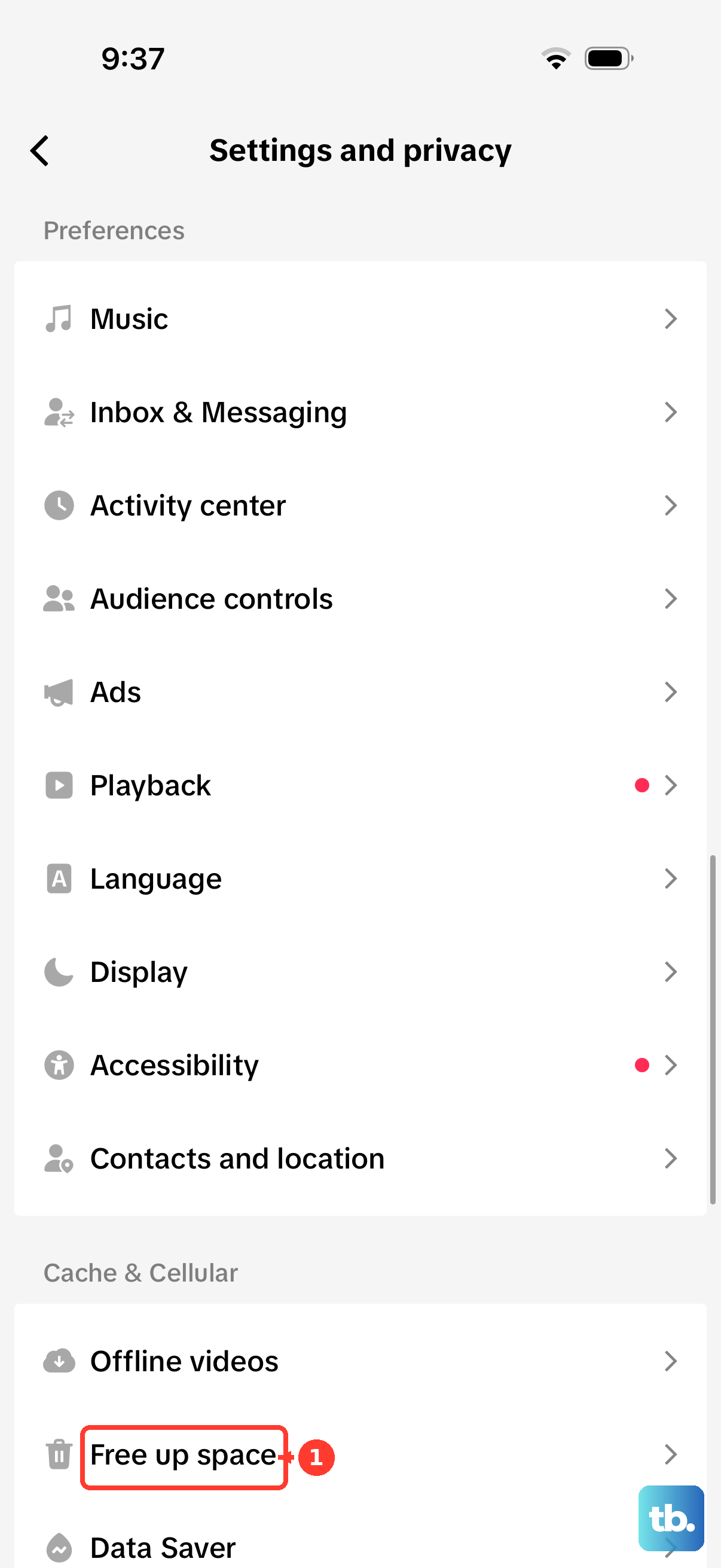
- 2.Tap Menu, then tap Settings and privacy.
- 3.Tap Free up space.
- 4.Next to Cache, tap Clear.
- 5.Tap Clear again to confirm, then retry Search.
Clear The In-App Browser Cache
Use this when search results appear, but result links, login views, or embedded TikTok pages fail after you tap through. TikTok keeps a separate cache and cookie setting for its in-app browser.
Open TikTok, tap Profile, then tap the three-line icon.
Go to Settings and privacy.
Depending on your app version, open Activity or Security.
Tap Clear cookies and cache, then tap Clear.
Update Or Reinstall TikTok
Open the App Store on iPhone or iPad.
Tap the My Account button or your photo, then tap App Updates.
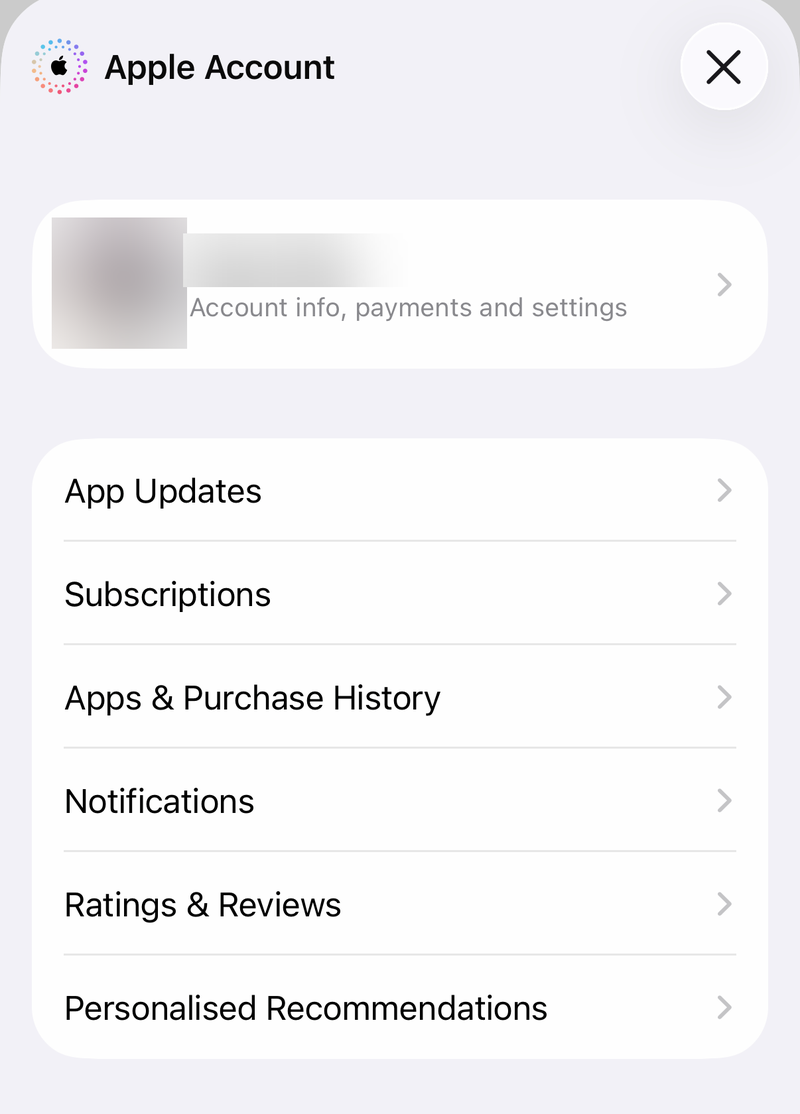
Tap Update next to TikTok, or tap Update All.
On Android, open the Google Play Store, tap your profile icon, then tap Manage apps & device.
Under Updates available, tap See details, then tap Update next to TikTok.
If updating does not help, uninstall TikTok and reinstall it from the official App Store or Google Play TikTok page.
Reinstalling removes local app data from the device and may require you to sign in again.
Use the current search icon or search field; many current TikTok versions no longer show the old bottom Discover tab.
Review Restricted Mode And Family Pairing
If TikTok search works but results look limited, missing, or age-filtered, Restricted Mode or Family Pairing controls can be the reason. These settings apply inside the TikTok mobile app.
In TikTok, tap Profile, open Menu, then go to Settings and privacy.
Tap Content preferences, then tap Restricted Mode.
Follow the in-app steps to enter or set a passcode, then turn Restricted Mode off.
For a teen account connected through Family Pairing, use the parent account.
Open Profile, tap Menu, go to Settings and privacy, then tap Family Pairing.
Select the teen’s account, then review Content preferences, Restricted Mode, and the Search setting, which controls whether the teen can search for videos, users, hashtags, and sounds.
Filter keywords is a separate control. It removes matching posts from the teen’s feeds rather than from search results, so check it for feed problems and check Search for search problems.
If search is still limited after content settings are corrected, clear TikTok cache and test the same search again.
Frequently Asked Questions
Why does TikTok search show unrelated results?
When many users report unrelated or sparse results at the same time, the problem can be on TikTok’s side. Test TikTok web and another device, then wait and retry later.
Can I fix TikTok search without deleting the app?
Yes. Force close TikTok, switch your internet connection, use TikTok web, clear TikTok cache, and update the app before reinstalling.
Why is TikTok search missing some videos?
Restricted Mode limits which videos and topics are available, so search returns fewer results. On a teen account, Family Pairing has a Search setting that controls whether the teen can search for videos, users, hashtags, and sounds. Filter keywords is different: it filters feeds, not search results.
How do I report broken TikTok search?
In TikTok, go to Profile, Menu, Settings and privacy, Report a problem, choose the closest search or app issue, tap No if asked whether it was resolved, then use Need more help to submit details.