
Your Google Pixel 10a is a powerhouse, but when it starts feeling like a pocket warmer, it's a real problem. Overheating doesn't just make the phone uncomfortable to hold, it can throttle your performance, kill your battery life, and even stop charging completely. Let's walk through the nine most effective fixes to cool things down.
Force Restart Your Pixel 10a
Before diving into anything complicated, try a force restart. This clears out any temporary software glitches that might be ramping up your processor for no reason.
Press and hold the Power button for 30 seconds, or press and hold Power + Volume Up for a few seconds, then tap Restart. It takes less than a minute and is completely safe.
Swap Out Your Charger and Cable
The Pixel 10a supports up to 30W wired charging, but it's picky about its accessories. Using a cheap or worn-out USB-C cable can cause the charging circuit to work inefficiently, generating excess heat.
Make sure you're using a USB-C PPS charger rated for 45W. If your phone gets hot while charging, especially intermittently, the cable is the first thing I'd suspect. Try a different high-quality cable and see if the temperature drops.
Clean the USB-C Charging Port
A clogged charging port is a surprisingly common cause of overheating on the Pixel 10a. Pocket lint and debris can prevent a solid connection, forcing the phone to work harder to draw power.
Power off your phone and take a close look inside the port. If you see gunk, carefully dig it out with a wooden toothpick or use a can of compressed air. Be gentle with it, you don't want to damage the pins inside. A clean connection runs cooler and charges faster.
Fall Back to Wireless Charging
If you've cleaned the port and the cable seems fine but your phone is still overheating while plugged in, try wireless charging instead. The Pixel 10a supports standard Qi wireless charging at up to 10W.
It won't charge as fast as the wired 45W, but it bypasses the USB-C port entirely. This is a great way to isolate the problem, if it charges coolly on a wireless pad, the issue is almost certainly with your wired port or cable.
Dial Down the Screen Brightness
The Pixel 10a has a bright display, but running it at max brightness in direct sunlight is a guaranteed recipe for overheating. Head into Settings > Display > Adaptive Brightness and make sure it's on.
If you're gaming or streaming, consider dropping the screen resolution or refresh rate temporarily to take the load off the GPU. Less screen power means less heat.
Update to the Latest Android 16 Build
Software bugs are a known culprit for overheating issues on the Pixel 10a. A runaway process or a memory leak in an older build can keep the CPU pegged at 100%.
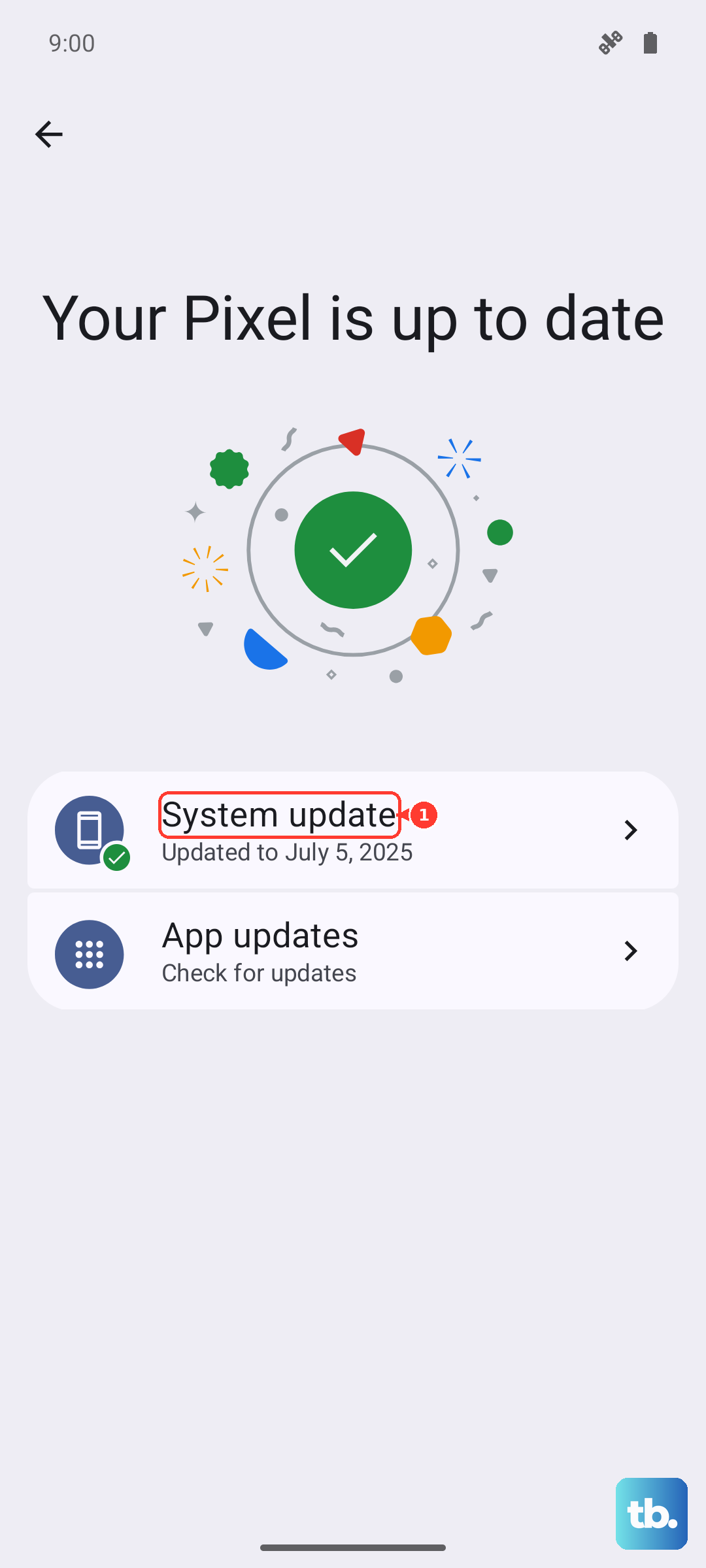
Check for updates by going to Settings > System > System update. Installing the latest patch often includes thermal performance improvements. Outdated apps can cause similar issues, so make sure everything is up to date in the Play Store too.
Kill Battery-Draining Background Apps
Sometimes an app goes rogue in the background, using more power than it should. This creates heat without you even touching the phone. Go to Settings > Battery > Battery usage and look for apps with unusually high background activity.
If you see one, force stop it or uninstall it to see if things cool off. It's common to find a social media app or a poorly optimized game doing this.
Check Your Battery Health
If your Pixel 10a is consistently hot, even when idle, the battery itself might be failing. A degraded or defective battery generates heat as an early warning sign. Go to Settings > Battery > Battery health.
Android 16 gives you a readout of the battery's maximum capacity and whether it needs service. If the health is significantly degraded, a replacement might be necessary.
Keep It Out of the Heat
You wouldn't leave a chocolate bar in your car on a sunny day, and you shouldn't leave your Pixel 10a there either. Extreme ambient temperatures are the fastest way to overheat a phone.
Avoid using your phone in direct sunlight for long periods, and don't leave it on the dashboard of your car. If it's getting hot, take the case off to let the heat dissipate faster.