
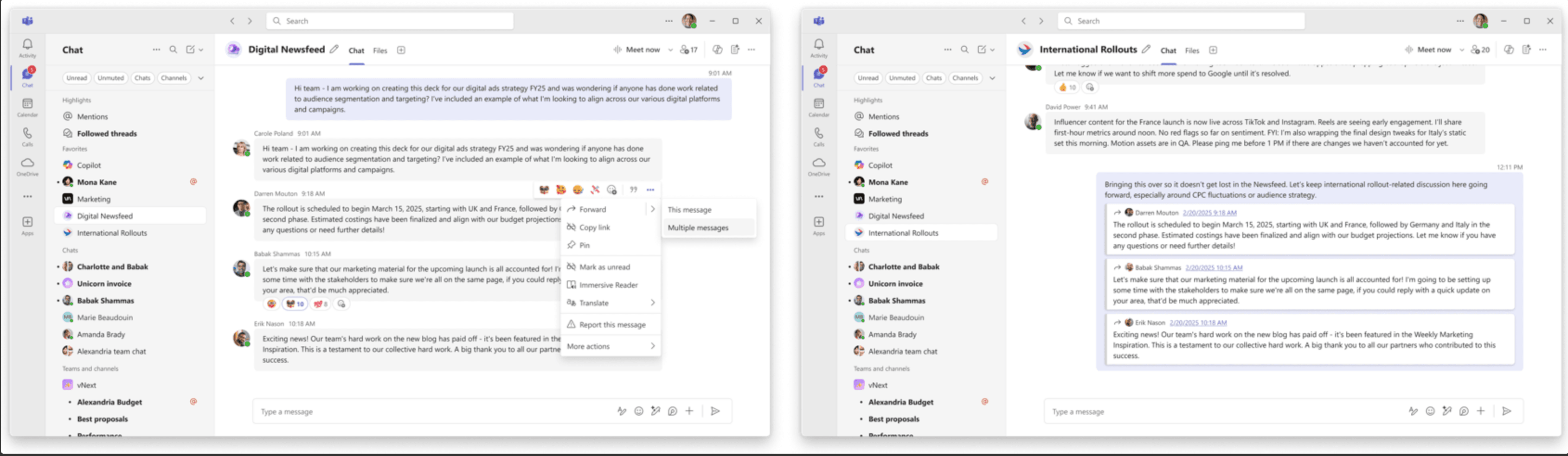
A basic WhatsApp feature that took years to reach Microsoft Teams now gives the platform an edge over rival Slack. Users can finally forward up to five messages at once in chats or channels, a capability WhatsApp has offered for years but Slack still lacks.
The multi-message forwarding arrives as part of a broader February update push that addresses collaboration, security, and enterprise continuity concerns simultaneously. Microsoft Teams now displays search results in a grid view with file previews, making it easier to differentiate documents with similar names without opening each one.
Security teams gain crucial visibility into potential threats within Teams conversations as Microsoft Defender for Office 365 extends URL click alerts to the platform. Previously focused on email threats, the enhancement proactively notifies administrators when users click on potentially malicious links shared in Teams messages.
Meeting experiences see multiple refinements, including customizable recap templates that adapt AI-generated notes to specific team workflows. Users can design custom templates using free-text prompts or choose from preset formats like Speaker Summary or Executive Summary layouts.
AI summaries now include visual references from screen shares, pairing conversation notes with the visual context that shaped discussions.
External collaboration receives attention through automatically assigned Trust Indicator badges that label users as familiar, unfamiliar, guest, verified, or unverified based on their relationship with an organization. Group chats and meeting chats including external participants are marked as "external" to enhance security clarity.
Teams Phone functionality expands with extended historical reporting in the Queues app, allowing supervisors to access up to 45 days of call history data instead of the previous 30-day limit. The change helps analyze call volumes and service patterns over longer periods for better staffing decisions.
Enterprise buyers evaluating Teams calling options received guidance this week from PanTerra Networks, which published its Microsoft Teams Phone System Complete Buyer's Guide for 2026. The guide highlights operational risks during Microsoft Teams outages, noting that when the platform experiences downtime, Teams Phone calling can be impacted without automatic failover.
Network connectivity transparency improves with new indicators showing participants when their connection strength drops during meetings. Users receive suggestions like turning off video to stabilize connections, while other attendees see weak connection notifications by names of those experiencing network issues.
The gallery layout in meetings becomes more flexible through resizable right and top galleries that let users prioritize content or participant visibility. Custom banners for recording and transcription allow IT administrators to tailor notification messages displayed when those features are enabled across all supported languages.
Microsoft unified the Copilot experience across chats, channels, and meetings for users with Microsoft 365 Copilot licenses, matching functionality available in the standalone Copilot app. The AI assistant can analyze chat history, meeting transcripts, and calendar content to generate smart recaps and rewrite messages based on activity patterns.