Need to change a Kindle battery? The repair route depends on your exact model, and Amazon directs owners of current Kindles to a qualified service provider. Start with service options and warranty coverage, then check the model-specific limits before considering the Paperwhite repair below.
Start with Amazon battery service
This gets your battery problem assessed and establishes the service options for your Kindle.
Sign in to Amazon in your browser or the Amazon shopping app.
Enter customer service in Amazon’s search bar.
Open Customer Service.
Select assistance for your registered Kindle.
Describe the battery problem.
Request available service options through chat or telephone assistance, including whether battery replacement is available for your model and country. Amazon does not guarantee a battery-only repair.
Your Kindle model determines the repair route
Amazon specifies qualified-provider battery replacement for the Kindle 11th Generation, including the 2024 release, and the Paperwhite 12th Generation families. The same requirement applies to Colorsoft, the current Scribe 3rd Generation model PA2MA4, and Scribe Colorsoft model PA2MA5.
The DIY procedure below covers the Paperwhite 12th Generation documented by iFixit. Do not apply it to every Signature or Kids variant, or to a basic Kindle, Colorsoft, or Scribe. You need an exactly compatible replacement battery before proceeding.
Older instructions describe a front-bezel-and-screw repair for the Paperwhite 2nd Generation or a slide-off battery cover on the original Kindle. Neither design describes current Kindles. Use the service route or instructions for your exact hardware, and remember that Paperwhite generation numbers and Amazon’s overall Kindle generation numbers are not interchangeable.
Check coverage before paying for a repair
Open Amazon’s Device Warranty for Kindle E-Reader and Accessories page.
Find your model in the warranty table.
Follow its One-Year Limited Warranty or Two-Year Worry-Free Guarantee link. Kindle Kids, Paperwhite Kids, and Colorsoft Kids are listed under the two-year guarantee; the other listed Kindle variants fall under the one-year warranty. Regional terms apply.
Contact Customer Service under the applicable terms to confirm eligibility. Your country of purchase, warranty period, and cause of failure determine coverage.
Obtain return instructions before sending the device. For an eligible defect, Amazon chooses repair, replacement, or refund. That does not promise a new battery in your existing Kindle.
Back up your stored material before returning it.
Package the Kindle according to the instructions you receive.
Tip: Establish warranty coverage before commissioning an independent repair.
If you need an independent repair shop
Model compatibility and replacement-part availability determine whether a shop can take on your battery repair.
Contact a qualified repair provider with your Kindle model and battery symptoms. All Mobile Matters in Arizona advertises Kindle repair through Schedule a repair or a shop visit.
Have the technician confirm that the shop services your exact e-reader. The provider does not publish a universal compatibility list for current models.
Request confirmation of replacement-part availability before booking.
Get a quote for the work.
Ask about collection if you cannot visit. All Mobile Matters offers conditional courier pickup and return.
Confirm the collection and return arrangements for your repair. Amazon’s requirement for a qualified provider does not establish that a particular independent shop is Amazon-authorized.
Replacing a Paperwhite 12th Generation battery yourself
iFixit documents a third-party replacement procedure for the Paperwhite 12th Generation. Amazon requires a qualified service provider and instructs consumers not to access the battery. This is not an Amazon-supported consumer repair.
Stop if the battery is swollen.
Power off the Kindle.
Unplug it before opening the housing.
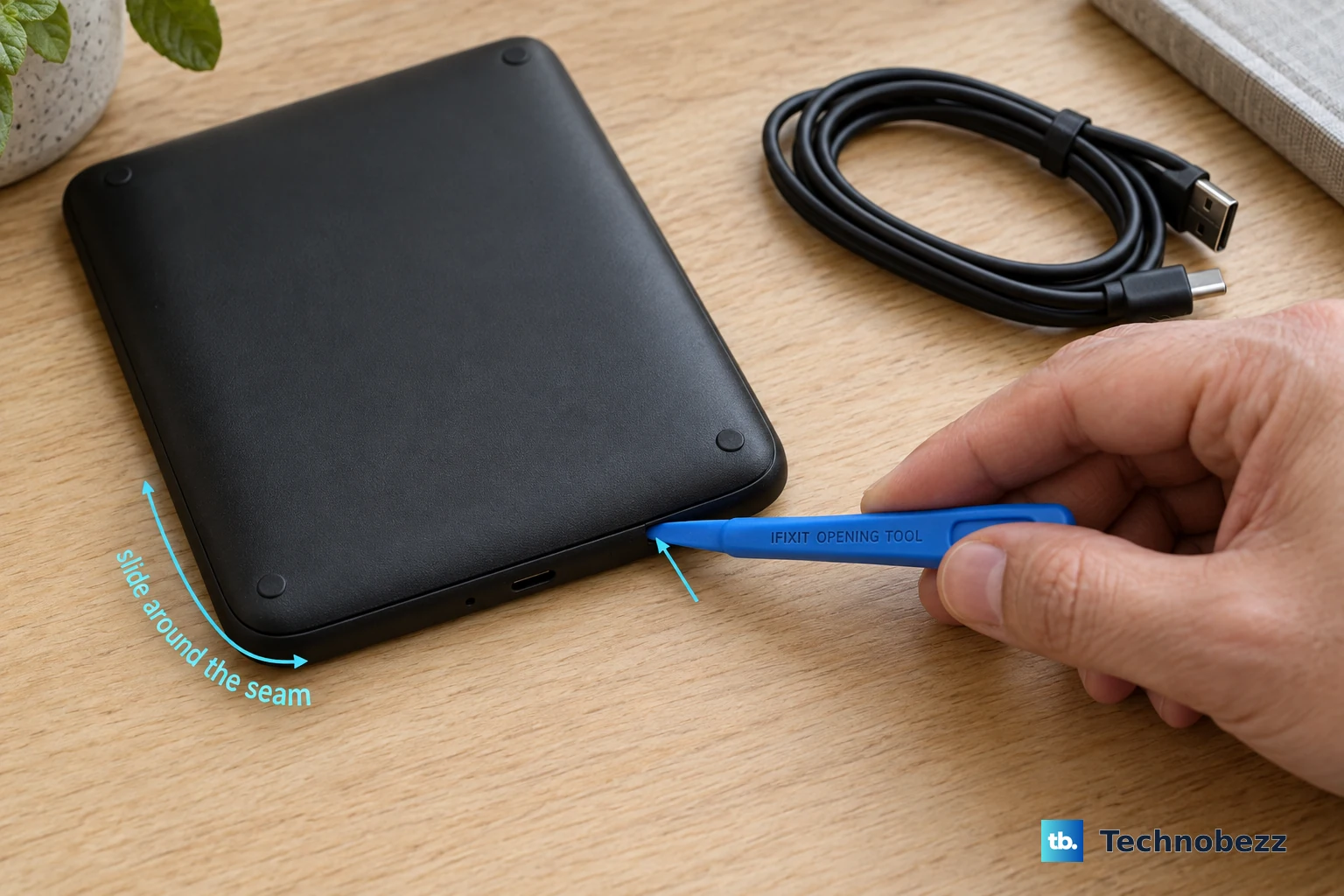
Work plastic opening tools around the rear-cover seam to release the clips.
Remove the rear cover once the clips are released.
Lift the battery connector straight up from its socket without lifting the board socket or disturbing nearby components.
Carefully separate the adhesive beneath the battery using nylon or plastic tools, without bending or puncturing the battery.
Remove the freed battery.
Install an exactly compatible replacement battery, renewing adhesive as needed.
Reassemble the Kindle in reverse order.
If you cannot complete the replacement or it does not resolve the problem, contact Customer Service or a qualified repair provider for assessment.
Frequently Asked Questions
Does a Kindle restart restore battery capacity?
No. Amazon’s restart procedure addresses intermittent freezing or slow performance, not a worn battery’s physical capacity. Hold the power button for 40 seconds, continuing past the power dialog or blank screen. Release the button. Wait for the Kindle to reboot.
Can a factory reset or battery-saving setting replace a battery?
No. A factory reset, battery-saving setting, app, or software download cannot physically replace a Kindle battery. Replacement requires a hardware repair.
Is there a direct device-support route for US Kindle owners?
Yes. For the Kindle 11th Generation and Paperwhite 12th Generation, Amazon documents this route: open www.amazon.com/devicesupport, select United States, open Help & Troubleshooting, then choose Contact Us. Request battery diagnosis and replacement options.