Linksys router login usually fails because your device is not on the Linksys network, the local address changed, or the router password is wrong. The fix is to use local access, sign in with the router admin password, and switch to recovery only when the login page or password will not work.
Start with the local router page first. Then use the app, mesh-specific addresses, IP lookup, password reset, or factory reset path that matches your router.
Start With The Local Router Page
The most common Linksys router login problem is starting from the wrong connection.
Connect your phone, tablet, or computer to your Linksys Wi-Fi network.
Open a web browser and type 192.168.1.1 or myrouter.local in the address bar.
Press Enter.
Enter your router password and choose Sign In.
If you changed the router IP address, enter that changed address instead of 192.168.1.1.
Open The Linksys App On Your Phone
The Linksys app applies when you manage a Linksys Smart WiFi router, Linksys Intelligent Mesh system, or Linksys Cognitive Mesh system from a phone. Your phone still needs to be connected to your Linksys Wi-Fi before local app login works. Linksys says continued app access with the router password does not apply to the EA8100, EA7450, EA7430, EA7250, and EA7200, so use the browser login on those models.
On iPhone or iPad, open the Linksys app and tap Manage Your Wi-Fi.
On Android, open the Linksys app and tap Log in.
Choose the Router Password tab.
Enter the router admin password and tap Log in.
If the app is not installed, get the Linksys app from the App Store on iOS or the Play Store on Android. Linksys lists iOS 14.1 or later for iPhone and iPad, and Android 9.0 or later for Android devices.
Sign In To A Linksys Mesh Router
Connect a desktop computer to your Linksys Mesh network.
Open a browser and go to the router address.
At the local login page, enter your router password in the Access Velop/Router field.
Click Sign In.
If the Linksys Smart Wi-Fi sign-in screen opens, click For local access and sign in with the router password.
For mesh models in the MBE7000, MX6200, LN1100, and LN1400 lines, use www.myrouter.info, myrouter.info, or https://192.168.1.1.
For Linksys MBE7000PW-HK or LN1400PW-HK routers provided by PCCW ISP with IPTV enabled, use https://192.168.10.1.
Keep the router password separate from your Wi-Fi password unless your model uses the same default password from its product label.
Find The Router IP When 192.168.1.1 Fails
This fixes a login page that will not load because the router’s local IP address is no longer 192.168.1.1.
On iPhone or iPad, open Settings.
Tap Wi-Fi.
Tap the info icon next to the connected Wi-Fi network.
Read the address shown in the Router section, then enter that address in your browser.
On Samsung Galaxy, open Settings, then Connections, then your Wi-Fi name.
Tap the gear icon and choose Manage router.
Use the router IP shown in the browser address bar.
On Google Pixel, open Settings, tap Network & internet, then Internet, and find the Wi-Fi network you are connected to.
Tap the gear icon next to that network, then open Network details, expanding Advanced if your Android version shows it.
Enter the displayed IP address in a browser.
On Windows, right-click the network icon on the taskbar and open Network & Internet settings.
On Windows 11, open Advanced network settings, then More network adapter options. On Windows 10, click Change adapter options.
Double-click your connection and choose Details.
Use the IPv4 Default Gateway address in your browser. You can also open Command Prompt, run ipconfig, and use the Default Gateway address for your connection.
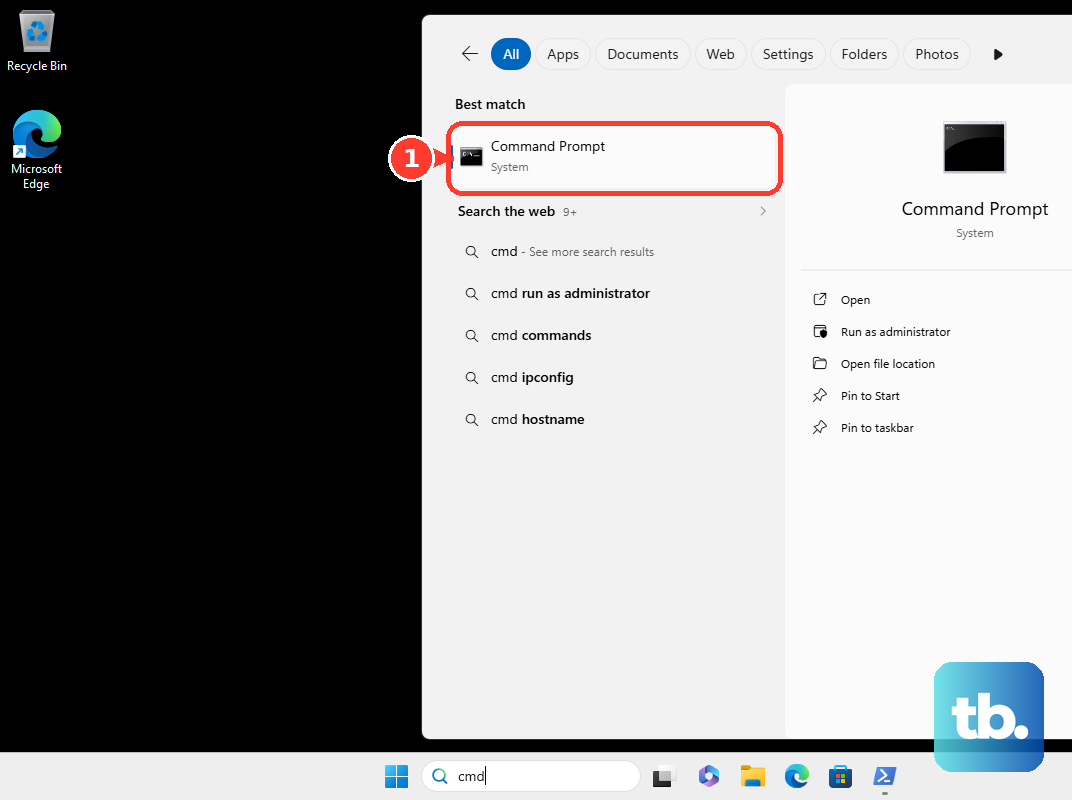
On current macOS, open the Apple menu, choose System Settings, then click Wi-Fi.
Click Details next to your connected network, then open TCP/IP.
Use the address shown in the Router section. On macOS Monterey and earlier, click the Wi-Fi icon, choose Open Network Preferences, click Advanced, then TCP/IP.
Pass The Browser Security Warning
This applies when a Linksys router with current firmware uses HTTPS for local login, such as https://192.168.1.1. The warning appears before the router page opens.
In Google Chrome, click Advanced, then Proceed to 192.168.1.1 (unsafe).
In Microsoft Edge, click Advanced, then Proceed to 192.168.1.1 (unsafe).
In Firefox, click Advanced..., then Accept the Risk and Continue.
In Safari, click Show Details, then visit this website, then Visit Website.
After the page loads, sign in with the router password.
Reset A Forgotten Router Password
This fixes a forgotten router admin password when your Linksys router or parent node has a Recovery Key printed on its product label.
Connect a device to your Linksys Wi-Fi network.
Open a browser and go to the router’s web interface.
Click Reset Password.
Enter the Recovery Key from the bottom of the parent router.
Select Submit.
Create a new password and password hint.
Click Reset.
After the settings apply, log in again with the new router password.
In the Linksys app, open Manage Your Wi-Fi on iOS or Log in on Android.
Tap Router Password, then tap Reset password.
Follow the prompts, enter the recovery key, tap Continue when prompted, create a new password, and tap Submit.
Set Up The Router First If It Has Never Been Configured
Use the browser setup flow below on Linksys Smart WiFi Router models when the router is new, reset, or waiting for its first admin password. Linksys Mesh models such as the MBE7000, MX6200, and LN1400 have their own setup methods that start at www.myrouter.info, myrouter.info, or https://192.168.1.1, and an ISP-supplied model can use a different address.
- 1.Connect to the router’s default Wi-Fi using the credentials on the bottom label, or connect a computer by Ethernet to any LAN port.
- 2.Open a browser and go to 192.168.1.1 or myrouter.local.
- 3.Check the agreement box and click Next.
- 4.Continue through the setup wizard.
- 5.Create a router admin password and password hint, then click Next.
- 6.Write down the new Wi-Fi and router admin information, then click Next.
Pick The Right Default Password For Specific Models
On the Linksys MX4300, also sold as LN1301, connect your computer to the router’s Wi-Fi name and open https://192.168.1.1 in a browser. Enter the router password and choose Sign In. The default router password is the same as the default Wi-Fi password printed on the bottom of the router.
On a Linksys Classic Micro Router, open https://192.168.1.1 or https://myrouter.local from a desktop browser. Click the mobile phone image, then enter your customized router password. If you have not customized it, the default password is admin.
On Linksys MR20WH, you can also use http://linksysxxxxx.local, replacing the x’s with the last five digits of the router’s serial number.
Skip The Old LinksysSmartWiFi.com Login
Older instructions may point you to LinksysSmartWiFi.com or a Linksys cloud account for router access.
Linksys says desktop access through LinksysSmartWiFi.com is no longer supported, new Linksys cloud accounts are no longer supported, and remote access is no longer supported with the latest firmware. Use local login instead by connecting to the router network and opening https://192.168.1.1 or myrouter.local in a browser.
If local login still fails after password recovery, use a hardware factory reset. For Linksys mesh routers, keep the router powered on, press and hold the reset button for 10 seconds until the red-light sequence described by Linksys, release it, then set up the router again; for Linksys Intelligent Mesh WHW, MX, and MR series, wait for the purple or blue light, press and hold reset for at least 20 seconds until the light goes out and turns bright red, then set up the router again.
Frequently Asked Questions
What is the default Linksys router login address?
Use 192.168.1.1 or myrouter.local after connecting to the Linksys router network. Some mesh models also use myrouter.info, and a changed router IP must be entered instead.
What password do I use for Linksys router login?
Use the router admin password. On the Linksys MX4300/LN1301, the default router password is the same as the default Wi-Fi password printed on the bottom of the router. On a Linksys Classic Micro Router, the default password is admin unless you changed it.
Can I still log in through LinksysSmartWiFi.com?
Linksys says desktop access through LinksysSmartWiFi.com, new Linksys cloud accounts, and remote access are no longer supported with the latest firmware. Use local browser login instead.
What happens after five wrong password attempts in the Linksys app?
Linksys says you can regain access by restoring the router to factory settings and setting it up again. On a mesh system, you can also use Reset password on the Router Password tab with the Recovery Key printed on the router sticker.