TikTok Slash and Free stops working when the event no longer qualifies, the account is missing Shop setup, the offer is invalid, or the app is holding stale data. Start with the offer checks first, then refresh the app only after the promo still looks active. These fixes keep you inside TikTok Shop, where the purchase and payment need to happen.
Check the promo before changing your phone
Open the Slash and Free link, LIVE shopping event, or price-cut screen inside the TikTok mobile app. Check the countdown timer, participation progress, lowest possible price, final price, inventory, event duration, and target participation level.
If the countdown timer expired before you joined, you are not included in that event, and you cannot join once inventory is gone. Missing the target participation level is different: it does not cancel a purchase you already joined.
At the end of the countdown, TikTok automatically creates an order for eligible participants and charges the final price, which can be higher than the lowest possible price or equal to the starting price. You cannot retract participation through the LIVE Price Cut interface, though statutory withdrawal and cancellation rights still apply. There is no phone setting that turns a closed event into a free checkout.
If the offer is still active and the event details match the promo rules, finish your payment and shipping setup next.
Finish payment and shipping setup
For LIVE Price Cut participation, TikTok requires a verified payment method and shipping address. In the TikTok event or checkout screen, add or update those details when prompted.
If TikTok shows a buyer onboarding prompt, complete the requested buyer information before returning to the promo. TikTok Shop purchasing features are for buyers who are 18 or older.
After the details are saved, reopen the same Slash and Free link or product page from the same account.
Restart TikTok and refresh the connection
On iPhone X and later, or on iPad, swipe up from the bottom of the screen and pause in the middle. On iPhone SE, iPhone 8 and earlier, and iPod touch, double-click the Home button instead. Swipe left or right until the TikTok preview is centered. Swipe up on the TikTok preview to close it.
On Android, swipe up from the bottom, hold, then let go. Swipe up on the TikTok app card to close it. Restart your phone or tablet. Open TikTok again.
Switch from Wi-Fi to cellular data, or from cellular data to Wi-Fi. Open the Slash and Free link or Shop event again. If one network works, keep that connection active until checkout finishes.
Clear TikTok cache
This fixes stale app data that blocks promo pages, Shop links, and event screens. Open TikTok. Tap Profile. Tap Menu.
Open Settings and privacy. Tap Free up space.
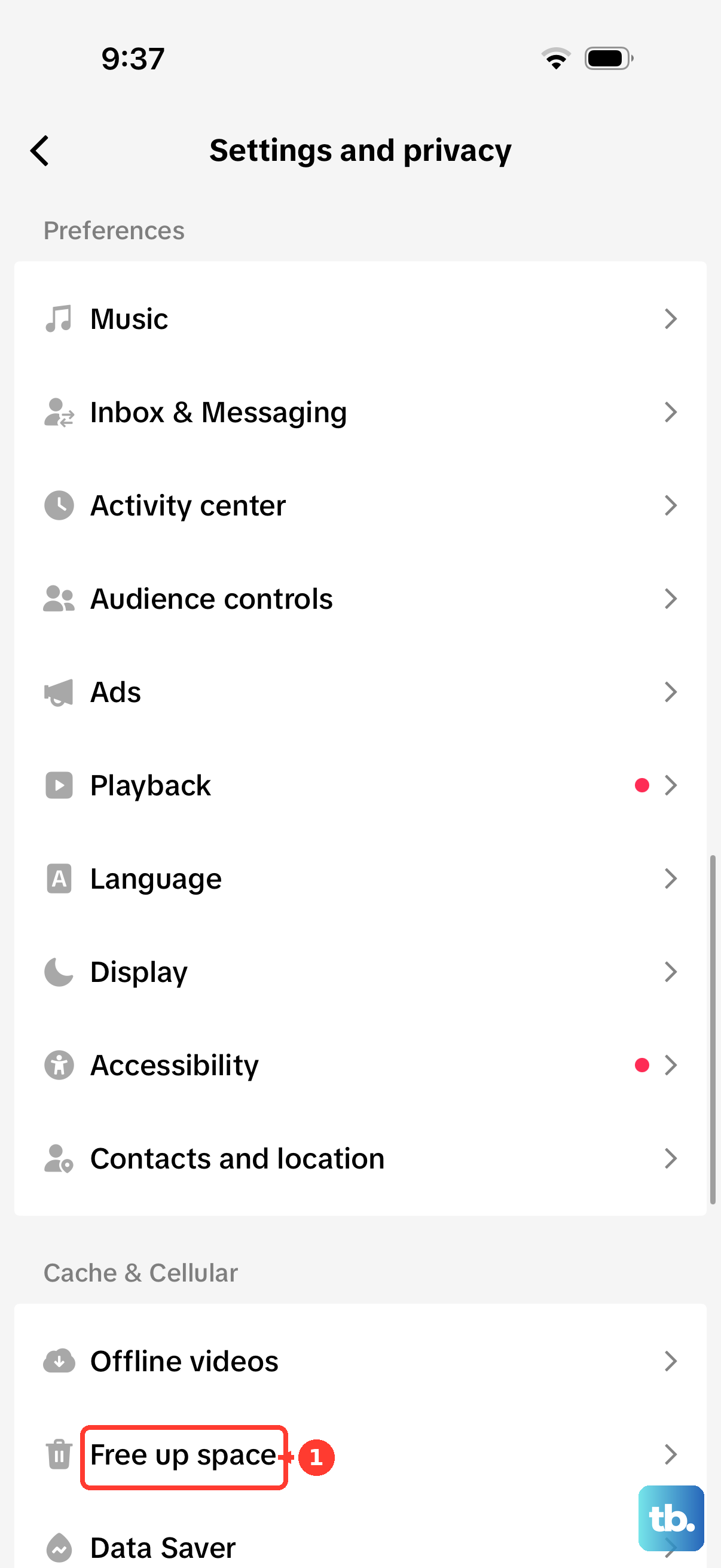
Tap Clear next to Cache. Open the Slash and Free offer again.
Update the full TikTok app
Use the full TikTok app for Shop promos. TikTok Lite has fewer features because it is designed to save storage and optimize performance.
On iPhone or iPad, open the App Store, tap the My Account button or your photo, go to App Updates, and tap Update next to TikTok. Tap Update All to install every pending app update.
On Android, open Google Play Store, tap your profile icon, open Manage apps & device, tap See details under Updates available, and tap Update next to TikTok. Tap Update all to install every pending update.
If TikTok is not installed, use the official TikTok - Videos, Shop & LIVE listing in the App Store or Google Play and choose Get, Install, Open, or Update as shown.
Reinstall TikTok after app fixes fail
This fixes corrupted app data, but local-only drafts are at risk when TikTok is deleted. On iPhone or iPad, touch and hold TikTok. Tap Remove App. Tap Delete App.
Tap Delete. Reinstall TikTok from the App Store. Sign back in to the same TikTok account.
On Android, open Google Play Store. Tap your profile icon. Open Manage apps & devices. Tap Manage.
Select TikTok. Tap Uninstall. Reinstall TikTok from Google Play. Sign back in to the same TikTok account.
Use official TikTok Shop paths only
Open the full TikTok app on your phone. Open the promo from the Shop tab, a product detail page, a shoppable video, a LIVE shopping bag, or a creator or seller Showcase.
Use only the offer TikTok shows in your message, email, notification, or in-app coupon area. Check the validity window, eligibility, minimum spend, maximum savings, and usage instructions.
Ignore third-party code dumps, resold coupons, altered coupons, and random Slash and Free link farms. Use normal in-app participation with genuine invited participants. Fake referrals, multiple accounts, bots, automation, and coordinated manipulation put the promo and account at risk.
Watch out for off-platform free offers
Use this check when the free item came from a seller or creator giveaway instead of a TikTok Shop promo screen. A valid TikTok Shop giveaway uses the official LIVE Giveaway feature, allows free entry, and shows clear terms.
Stay inside the official TikTok app, TikTok Shop checkout, or event screen. Ignore requests to pay through direct PayPal, Cash App, seller DMs, external checkout links, or third-party sites. If the seller has a product or order page in TikTok Shop, use that page for contact instead of moving the transaction outside TikTok.
Report the issue or contact TikTok Shop
When the offer is active, the account is eligible, and the app fixes did not clear the error, send TikTok the promo details.
- 1.Open TikTok from the phone used for the promo.
- 2.Tap Profile, then tap Menu.
- 3.Open Settings and privacy.
- 4.Tap Report a problem.
- 5.Follow the prompts for the affected Shop, order, promo, or event issue.
- 6.For an order, cancelled $0 order, or seller-specific problem, contact the seller from the order or email TikTok customer service at [email protected].
Frequently Asked Questions
Why does TikTok Slash and Free show a price instead of $0?
The event depends on the timer, inventory, target participation level, and final price rules shown on the promo screen. Once the event expires, inventory ends, or the target is missed, the checkout follows the promo result shown in TikTok. Missing the target does not cancel your order; the final price can land above the lowest possible price or at the starting price. Even when the event price reaches $0, applicable taxes and shipping and handling fees are shown separately and added to the amount charged.
Should I fix TikTok Slash and Free from a computer?
Use the TikTok mobile app. TikTok Shop shopping surfaces are in the app, including Shop, product pages, shoppable videos, LIVE shopping bags, and showcases.
Does TikTok Lite support every Shop promo?
Use the full TikTok app. TikTok Lite has fewer features to save storage and optimize performance, so open Slash and Free links in the full app.
What happens if I use bots or extra accounts to reach the target?
TikTok's LIVE Price Cut terms prohibit manipulation and allow cancellation, disqualification, feature restriction, and account suspension.