Instagram chat not loading leaves Direct stuck on a blank screen, a spinner, or a conversation that refuses to refresh. Start with the fastest app and connection fixes, then move to inbox filters, web checks, account status, and service problems.
Restart Instagram and your device first
Use this when Messages opens to a blank screen, keeps spinning, or stops responding after you tap the chat icon. Restarting is the first basic fix when Instagram is having trouble.
Close Instagram, restart your phone or tablet, then open Instagram again.
Tap Messages and check whether your inbox refreshes.
If the app is frozen on iPhone or iPad, swipe up from the bottom of the Home Screen and pause.
Find Instagram, swipe up on its preview, then reopen it. On iPhone SE, iPhone 8 and earlier, or iPod touch, double-click the Home button, swipe up on Instagram's preview, then reopen it.
On Android, open Settings, go to Apps, choose See all apps or App info, tap Instagram, then tap Force stop and OK.
Reopen Instagram and tap Messages.
Fix the connection Instagram is using
A weak or blocked connection stops chats from refreshing and keeps chat media stuck. Switch from Wi-Fi to cellular data, or from cellular data to Wi-Fi, then reopen Instagram and tap Messages.
On iPhone or cellular iPad, open Settings, tap Cellular or Mobile Data, scroll to Instagram, and turn cellular data on for it.
On Android, open Settings, tap Network & internet, go to Data usage, open Data saver, tap Unrestricted data access, find Instagram, and turn it on.
Inside Instagram, go to your Profile or profile picture, open Menu, tap Data usage and media quality, then turn off Data saver when chat media loads slowly.
Update Instagram from the official store
An outdated Instagram app breaks Direct after a messaging change or app bug fix.
On iPhone or iPad, open the App Store and tap your profile icon.
Go to App Updates, then tap Update beside Instagram when it appears.
Instagram's App Store listing requires iOS 16.3 or later or iPadOS 16.3 or later.
If Instagram does not show an update and your device software is behind, use Apple's software update flow for iPhone or iPad.
On Android, open Google Play Store and tap your profile icon.
Go to Manage apps & device, tap See details under Updates available, then tap Update beside Instagram.
Use only the official Instagram listing from the App Store or Google Play. Google says app updates provide the latest features and improve security and stability.
If the update is large or the download stalls, connect to Wi-Fi before downloading.
Clear the app cache or reinstall Instagram
Use this reset path after restarting and updating leave the inbox stuck.
- 1.On Android, open Settings, tap Apps, choose See all apps or App info, then open Instagram.
- 2.Tap Storage & cache, then tap Clear cache.
- 3.If chats still do not load, tap Clear storage or Clear data, then sign back in.
- 4.On iPhone or iPad, touch and hold Instagram, tap Remove App, tap Delete App, then tap Delete.
- 5.Redownload Instagram from the App Store or Google Play, open it, and sign in again.
Apple warns that you might lose data stored in an app when you delete it, so use this after the faster fixes.
Look in message requests and hidden requests
Use this when the chat is missing rather than failing to load, especially for messages from people you do not follow. Instagram places those messages in requests instead of the main inbox depending on your settings.
Open Instagram, tap Messages, then tap Requests.
Open the request and choose whether to accept, delete, block, or report it.
Next, check hidden requests. In Messages, open Requests, then tap Hidden and review the messages there.
To review the filtering behind this, go to your Profile or profile picture, open Menu, then under How others can interact with you, tap Hidden words. Teen Accounts have stricter defaults.
You can also change who sends message requests. Go to your Profile or profile picture, open Menu, tap Messages and story replies, choose Message requests, then adjust the request settings shown for your account.
Try Instagram on the web
Use Instagram web to keep messaging and to separate app problems from account, network, or service problems.
- 1.Go to instagram.com in a current desktop or mobile browser and sign in.
- 2.Open Messages or Direct, then select the conversation that will not load in the app.
- 3.If web messages load but the app does not, use the app, device, cache, data, update, or reinstall steps above.
- 4.If web messages also fail, treat the problem as account, service, or network related.
For Instagram web problems in Chrome, open More, choose Delete browsing data, select a time range such as All time, select Cookies and other site data and Cached images and files, then choose Delete data.
In Safari on iPhone, open Settings, tap Apps, choose Safari, tap Clear History and Website Data, choose a timeframe, then tap Clear History. To keep history, use Advanced, then Website Data, Remove All Website Data, and Remove Now.
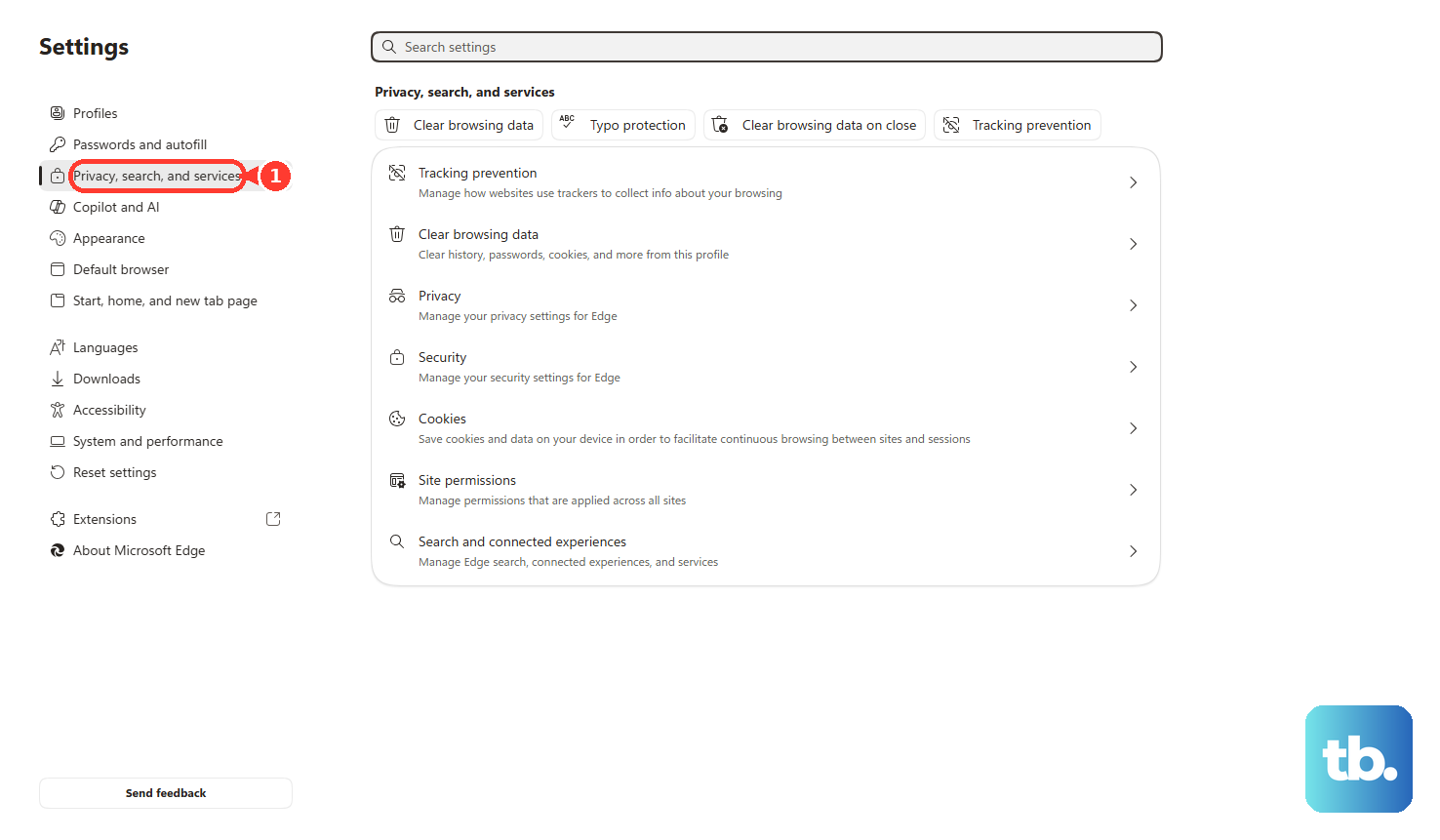
In Microsoft Edge, open Settings and more, go to Settings, choose Privacy, search, and services, open Clear browsing data, choose Choose what to clear, select a Time range, choose Cookies and other site data and optionally Cached images and files, then tap Clear now.
Check your account status and support options
Account restrictions affect messaging and other account actions. Open Instagram, go to your Profile or profile picture, open Menu, then tap Account Status and review any restrictions, warnings, or appeal options shown there.
When the app itself is malfunctioning, report it from the screen where the problem happens. Go to the broken chat screen, shake your phone, tap Report a problem, and follow the on-screen instructions.
If shake-to-report is unavailable or inconvenient, go to your Profile or profile picture, open Menu, tap Help, choose Report a Problem, and follow the prompts.
Meta AI support assistant is available for Instagram support topics in countries and territories where Meta has rolled it out. In Instagram, tap your profile picture or profile icon, open Menu, scroll to More info and support, tap Meta AI support assistant, describe the chat problem, and follow the prompts.
Meta Verified subscribers can use the support entry shown in Instagram for their verified account or subscription, then choose chat or email support.
If this method fails, try Instagram on the web and check whether your account shows restrictions under Account Status.
Wait out an Instagram service problem
The most common cause is a wider Instagram or Meta disruption when chats fail on more than one device and also fail on the web.
Open Meta Status and check whether relevant Instagram or Meta business products show a disruption. Meta Status focuses on Meta business products, so a consumer Instagram Direct outage does not always appear there.
When the same chat problem appears across the app and web, waiting is the practical fix. Keep Instagram updated, then try Messages again later.
What older chat fixes no longer do
Some older fixes point to Facebook-to-Instagram cross-app chats. Instagram says users can no longer chat with Facebook accounts on Instagram beginning in mid-December 2023, so use Instagram-to-Instagram messaging or Facebook and Messenger separately.
Old tutorials also point to an Update Messaging menu. Treat that as legacy advice and update Instagram through the App Store or Google Play instead.
Instagram says end-to-end encrypted messaging on Instagram is no longer supported as of May 8, 2026.
If this method fails because you expected an old encrypted Instagram chat surface to load, use standard Instagram chats or another encrypted messaging service.
Frequently Asked Questions
Why are some Instagram messages missing from my inbox?
Messages from people you do not follow go to Message requests instead of the main inbox depending on your settings. Open Instagram Messages, then check Requests and Hidden.
Can Instagram Lite fix chats not loading on Android?
Instagram Lite is an Android alternative in countries and on devices where it is available. It supports Direct messages and uses less data.
Does clearing Instagram data sign me out?
On Android, Clear cache is temporary. Clear storage or Clear data removes app data and signs you out. On iPhone or iPad, deleting and reinstalling the app might remove data stored in the app.
What should I do if Instagram chat will not load on Wi-Fi but works on cellular?
Switch connections first. If the issue only happens on one network, keep using the working connection and try Instagram web to confirm the app itself is working.