Facebook keeps closing just as you open it, scroll, or try to post. Start with the quick fixes below, then work through cache cleanup and reinstalling if it still won't stay open. For crashes on a computer, jump to the browser fixes.
Close Facebook and open it again
Start here when Facebook freezes or closes unexpectedly. On a Google Pixel, force-stop Facebook through Settings > Apps > See all apps > Facebook > Force stop > OK. Labels differ across Android manufacturers.
On an iPhone with Face ID, swipe up from the bottom and pause to open the app switcher. On a Home-button model, double-click Home instead. Swipe Facebook's preview upward to close it.
On an iPad, swipe up from the bottom, hold, then release to open Exposé. Swipe Facebook upward to close it. For a windowed app, use Window Controls > Close Window instead.
Open Facebook again. Repeat the activity that was failing.
Check for app and system updates
Use the steps for your device to update Facebook and its operating system.
- 1.On Android, open Play Store > profile icon > Manage apps & devices > Updates available, then update Facebook.
- 2.On iPhone or iPad, open App Store > profile icon > App Updates, then install Facebook's available update.
- 3.On Pixel, open Settings > System > Software update and install any available update.
- 4.On Samsung Galaxy, open Settings > Software update > Download and install.
- 5.On iPhone or iPad, back up your device first and connect it to power and Wi-Fi. Open Settings > General > Software Update, then select Download and Install when offered.
If Facebook still closes, restart your device
Still getting kicked out? Restart your phone next. The buttons depend on your model.
On Pixel 6 and later, including Fold, hold Power and Volume up to open the power menu. Tap Restart. For Pixel 5a and earlier, hold Power for approximately 30 seconds or until the phone restarts instead.
On a current Samsung Galaxy interface, swipe down from the screen's top-right corner to open Quick settings. Older One UI versions use a different panel gesture. Tap the Power icon > Restart > Restart.
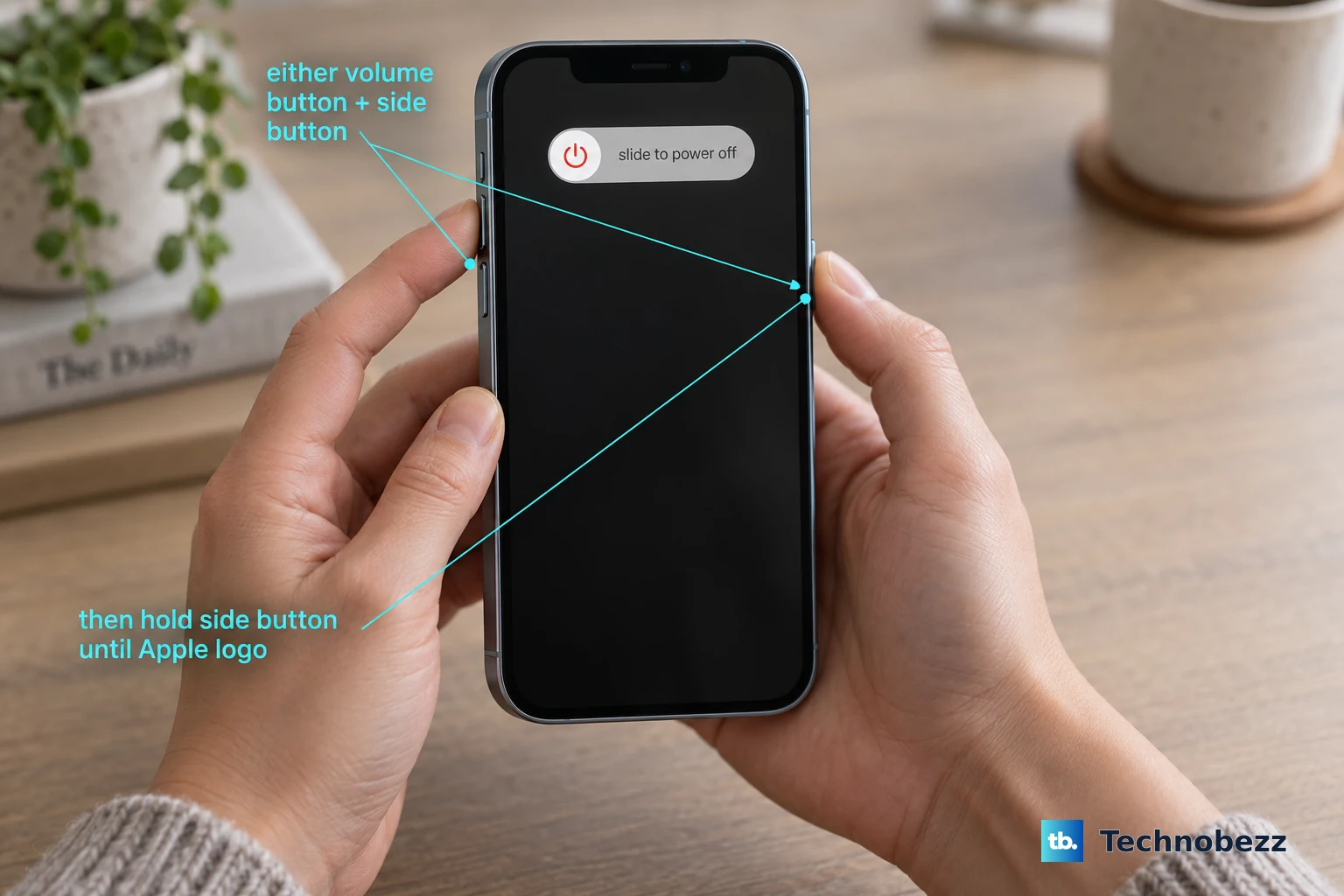
For an iPhone with Face ID, hold either volume button and the Side button until the power-off slider appears. On iPhone SE second or third generation and iPhone 6 through 8, hold the Side button alone. Drag the power-off slider.
Wait 30 seconds. Hold the Side button until the Apple logo appears. Try Facebook again after startup. If it still crashes, check storage and clear its Android cache next.
Free storage and clear temporary app files
Low storage contributes to app crashes. On Samsung Galaxy, remove an unused app through Settings > Apps > select the app > Uninstall.
Remove unnecessary local files if storage remains low. On iPhone or iPad, open Settings > General > iPhone Storage or iPad Storage. Review the storage recommendations.
Select an unwanted app to offload or delete. Offloading keeps its documents and data, so offloading Facebook does not reset its app data.
On Android, clear Facebook's temporary files. For Pixel, use Settings > Apps > See all apps > Facebook > Storage & cache > Clear cache. For Samsung Galaxy, use Settings > Apps > Facebook > Storage > Clear cache instead. Reopen Facebook to check whether the crash has stopped.
Reset or reinstall the Facebook app
This is the bigger reset: expect to lose local app data and sign in again after clearing Android app data.
- 1.On Pixel, open Settings > Apps > See all apps > Facebook > Storage & cache > Clear storage or Clear data > OK. On Galaxy, use Settings > Apps > Facebook > Storage > Clear data.
- 2.If resetting data does not help on Galaxy, open Settings > Apps > Facebook > Uninstall. Reinstall Facebook by Meta Platforms, Inc. from Google Play. This applies to devices where Facebook is removable.
- 3.On iPhone or iPad, hold Facebook's icon and choose Remove App > Delete App > Delete. Reinstall Facebook by Meta Platforms, Inc. from the App Store. Expect to lose locally stored app data when deleting Facebook.
- 4.Open the reinstalled app and test the activity that previously caused the crash.
Troubleshoot Facebook in your browser
Use these fixes when Facebook's webpage or the browser itself crashes.
In desktop Chrome, close unnecessary tabs to reduce memory pressure. Close other applications you aren't using. Pause active downloads. Reload Facebook.
If it still crashes, open More > Help > About Google Chrome to check for an update. Select Relaunch when offered.
Open a private session through More > New Incognito window. This test helps isolate session data and extension interference. Sign in to Facebook in that window. Repeat the activity that caused the crash.
If Facebook works there, turn off extensions through More > Extensions > Manage extensions. Retest Facebook in a regular window. Re-enable one extension. Test Facebook again.
Repeat this sequence with each extension to identify the offender. For persistent session-data problems, open More > Delete browsing data. Choose All time.
Select Cookies and other site data. Clearing this data affects sites beyond Facebook and means signing in again. Select Cached images and files. Click Delete data.
In Microsoft Edge, check for an update through Settings and more > Settings > About Microsoft Edge. Apply the available update.
In Firefox, enter its diagnostic mode through Menu > Help > Troubleshoot Mode… > Restart > Open. This temporarily disables extensions, themes, and hardware acceleration. Test Facebook in that mode.
On a Mac using Safari, open File > New Private Window. Test Facebook in the private window.
If Facebook works privately, remove its website data through Safari > Settings > Privacy > Manage Website Data > select Facebook > Remove > Done. Expect to sign in again after removing website data.
Keep using Facebook while the problem is resolved
Some crashes come from a particular Facebook release, as Samsung acknowledges. If you've reached this point, switch to another way of accessing Facebook while waiting for a corrected release.
Open facebook.com in a browser. Choose Log In. Test the same activity there. The website bypasses the native app and helps isolate the failure; it doesn't repair the installation.
On compatible Android devices where it is offered, install Facebook Lite by Meta Platforms, Inc. from Google Play. Meta describes it as a smaller app suited to limited storage and slower connections. Sign in to Facebook Lite to use it as an alternative to the full app.
If loading problems accompany the crashes, restart your router. Reconnect your device to the network. Try another Wi-Fi network or mobile data if the problem continues.
If those alternatives also fail, test Facebook in another browser. For crashes tied to a Facebook app release, check its store listing for updates and install a corrected release when one becomes available.
Frequently Asked Questions
Should I leave the Facebook Android beta if it keeps crashing?
If you're enrolled in the beta, return to the public version to test it. In Google Play, open the profile icon > Manage apps & devices > Beta > Facebook > You’re a beta tester > Leave > Leave. Uninstall the beta, then reinstall the public version.
What if I cannot delete Facebook from my iPhone or iPad?
Parental controls and device management can block deletion. For parental controls, ask the parent to set Deleting Apps to Allow. For a managed device, ask its administrator to permit deletion. This enables reinstalling; it doesn't repair the crash itself.
Can Safe mode help diagnose Facebook crashes on Samsung?
Safe mode is for investigating device-wide instability. It disables downloaded apps, so you cannot test a downloaded Facebook app there. Use it to investigate suspect recently installed apps when the device has broader problems.
Should I factory-reset my phone because Facebook keeps crashing?
A factory reset is not a routine response to a Facebook-only problem. Samsung treats it as a last resort for persistent device-wide instability. It erases device data, so back up first.