Your Vizio soundbar is silent, Bluetooth won't connect, or the subwoofer has stopped playing. Start with power and volume, then move to the section that matches the problem. Each model-specific fix names the soundbar it applies to, so you can use the right buttons and settings.
Start with power and volume
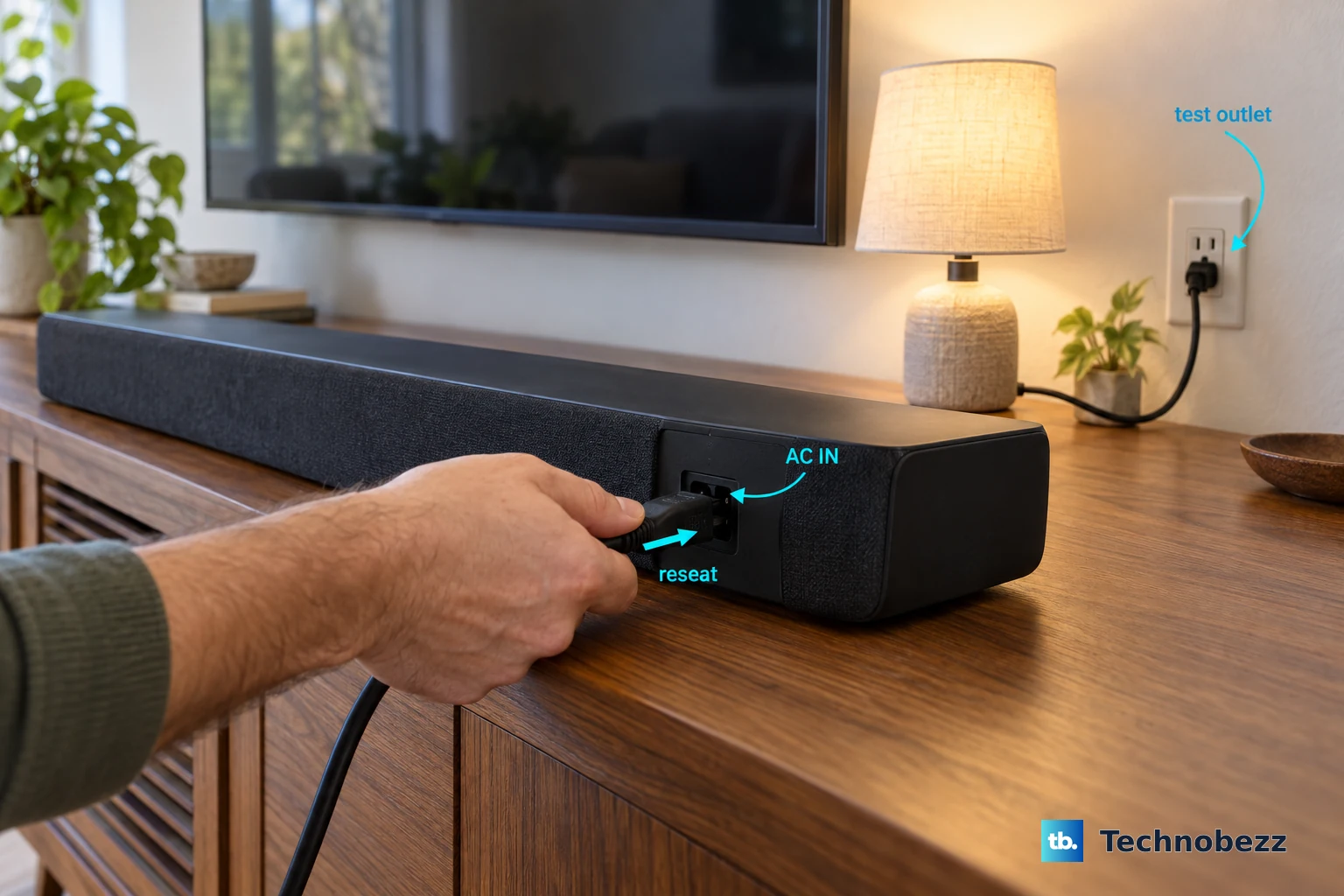
For an SV210Y-0808 with no power, reseat the soundbar’s power cord.
Test the electrical outlet with another device.
Press the soundbar’s Power button.
Turn on the connected TV to wake the SV210Y-0808 from standby.
Use the TV remote to unmute the audio.
Raise the volume with the TV remote.
For Bluetooth playback, also unmute the phone or other source device.
Raise the Bluetooth source device’s volume.
Tip: On the Elevate Pro SL714PW-1006, the power light is off by default, so a dark indicator alone does not mean the soundbar has lost power.
If TV audio is missing, check the HDMI connection
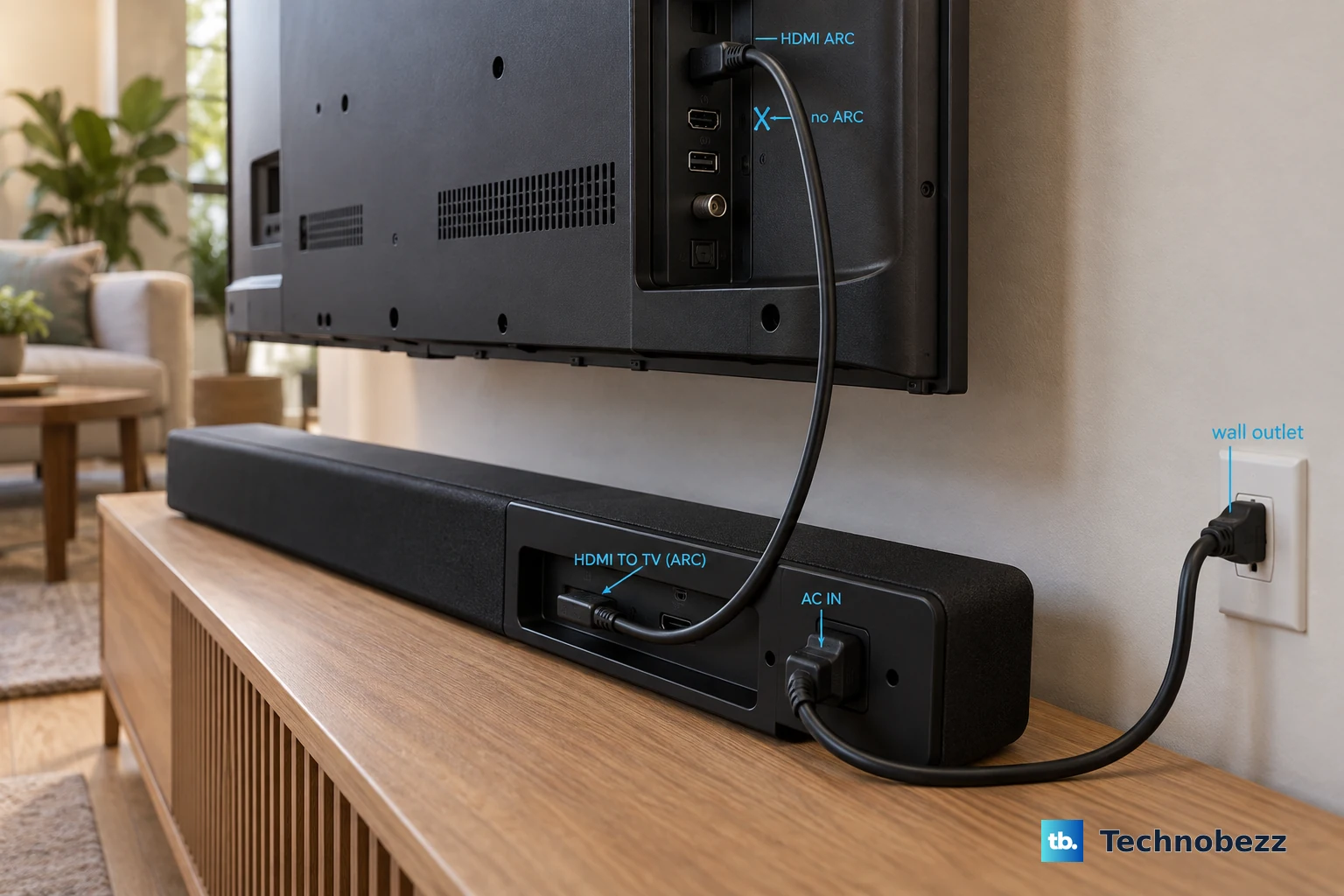
For the SV210Y-0808, connect the soundbar’s HDMI (eARC) port to the TV’s HDMI ARC/eARC port. The TV end needs that labeled connection.
Enable CEC in the TV’s settings. Use your TV manual to locate it, because the menu path varies by TV.
For an SV210M-0808 connected to an eARC-capable TV, also enable eARC to use supported high-quality audio formats.
For a Vizio HD/FHD TV covered by its 2024 manual and connected to an ARC-compatible soundbar, set eARC to Off to try audio over ARC. This compatibility option applies to that TV setup.
Resolve an unsupported audio format
This addresses audio-format incompatibility on the SV210Y-0808; rapid yellow flashing is an unsupported-format warning.
Use the source device’s manual to locate its audio-output setting.
Set that output to PCM.
If the connected TV offers variable output, change VARIABLE to FIXED or STANDARD.
Rule out the HDMI cable and TV
For an SV210Y-0808 with connection trouble, buzzing, or humming, work through these checks in order.
- 1.Reseat the connections between the soundbar and TV.
- 2.Substitute another HDMI cable.
- 3.Test the soundbar with another TV.
Get Bluetooth music playing again
On the SV210D-0806, app control and Bluetooth music require separate pairing. A connection in VIZIO Mobile does not complete music pairing.
Briefly press the soundbar’s Bluetooth button to begin music pairing.
Pair with the soundbar in your phone’s Bluetooth settings. Vizio’s SV210D-0806 guides list it as VIZIO AIO or VIZIO AIO SOUNDBAR.
If another phone is already streaming, disconnect the soundbar in that phone’s Bluetooth settings. Alternatively, hold the SV210D-0806’s Bluetooth button for two seconds, then release it to disconnect the existing music connection.
Pair the phone you want to use with the soundbar.
For the SV510M-0806, start music pairing by holding its Bluetooth button for two seconds.
Select VIZIO 5.1 Soundbar in the phone’s Bluetooth settings.
For an SV210D-0806 with audio breakup, move the phone closer to the soundbar.
Clear obstructions between the phone and soundbar.
Move or switch off nearby wireless equipment that is interfering with playback.
If playback still gets interrupted when you turn on the TV or change its volume, set Auto HDMI to Off in the soundbar’s VIZIO Mobile settings on the SV510MW-0906.
Bring back a silent subwoofer or surround speaker
On the SV510MW-0906, select Surround On in VIZIO Mobile when the surround speakers are silent.
Adjust Surround Volume if their output is too low.
Adjust Surround Balance if one side needs correction.
Select Speaker Test in VIZIO Mobile to run the SV510MW-0906’s built-in diagnostic.
To run that test with the hardware buttons instead, hold Bluetooth and Volume Up together for five seconds, then release.
For an Elevate Pro SL714PW-1006 with a disconnected subwoofer, unplug the subwoofer.
Wait five seconds.
Reconnect the subwoofer’s power.
To re-pair a disconnected SL714PW-1006 subwoofer or wireless surround speaker, hold the powered speaker’s POWER button for five seconds.
Hold the soundbar’s POWER button for four seconds.
Wait for solid white indicators.
Repeat the pairing sequence for each disconnected speaker.
Keep the SL714PW-1006 subwoofer at least five feet from the Wi-Fi router.
Move its wireless surrounds away from the router as well.
Tip: The SV510M-0806 uses different subwoofer pairing timings, five seconds on the subwoofer’s ON/OFF button followed by five seconds on the soundbar’s Power button.
Another phone can block app control
On the SV210D-0806, an existing connection to another phone blocks app control because only one app controller can connect at a time.
Close VIZIO Mobile on the other phone.
Open VIZIO Mobile on the phone you want to use.
Before pairing, download VIZIO Mobile and create or sign in with a Walmart account. Vizio requires both for SV210D-0806 app control, settings and system updates.
For initial app pairing, enable your phone’s Bluetooth near the powered SV210D-0806.
Select the soundbar from the list of discovered devices in VIZIO Mobile. Vizio’s guides list it as VIZIO AIO or VIZIO AIO SOUNDBAR.
If the initial discovery window has expired, briefly press the soundbar’s Bluetooth button.
Retry discovery in VIZIO Mobile.
To remove an existing app pairing before reconnecting, tap the soundbar name in VIZIO Mobile.
Open Paired Devices.
Tap the information button.
Select Unpair Device.
Confirm with Yes.
On iOS, also remove the VIZIO Mobile app’s Bluetooth pairing in the phone’s Bluetooth settings.
Repeat the app-pairing steps above.
Use your model’s update and reset options
For firmware information on your exact model, check Vizio Support.
On the MicMe SK210X-0805, sign in to VIZIO Mobile with your Walmart account, which Vizio requires to receive system updates. Then select VIZIO MicMe SB at the top of the app.
Select VIZIO MicMe SB again.
Choose Check for updates.
Install an offered update.
If you need to reset an SV510MW-0906, select the app option that matches what you want to clear: Reset Audio Settings retains Bluetooth pairings, while Factory Reset restores defaults and removes Bluetooth pairings.
For a hardware factory reset on the SV510MW-0906, SL714PW-1006, SV210D-0806, or SV510M-0806, hold Bluetooth and Volume Down together for five seconds, then release. This erases customized settings.
If the soundbar still does not work, request help through Vizio Support > Contact Us. Keep your proof of purchase. Obtain authorization before sending the product for service.
Frequently Asked Questions
Can I use an optical cable instead of HDMI?
The Elevate Pro SL714PW-1006 has no optical input. If your TV requires optical, contact Vizio Support for a connection solution.
Why is the bass weak even though the soundbar plays audio?
On the SV210D-0806, turn off Night Mode in VIZIO Mobile to address reduced bass. Adjust Subwoofer or Bass as needed. For unclear dialogue, adjust ClearDialog.
How do I fix sound that is out of sync with the picture?
On the SV510MW-0906, adjust AV Delay in the soundbar’s VIZIO Mobile settings.
Why did Atmos or DTS:X stop working after karaoke?
On the MicMe SK210X-0805, dock or power off both microphones to restore Atmos/DTS:X playback.