You want Microsoft Edge gone, but Windows does not let every PC remove it like a normal app. On eligible Windows PCs in the European Economic Area, Microsoft provides a supported uninstall path. On a typical US consumer PC, the supported move is to install another browser and set it as the default.
1. Confirm whether Edge can be removed
Start with eligibility: the uninstall button depends on the PC's Windows DMA compliance region. Microsoft supports uninstalling the built-in Microsoft Edge Stable browser on Windows 11 version 23H2 or later and Windows 10 version 22H2 when the device's Windows DMA compliance region is in the European Economic Area.
That region is chosen during device setup, and Microsoft says it can only be changed by resetting the PC. Outside the EEA, including the United States, Microsoft does not provide a supported consumer UI path to delete the built-in Edge Stable browser.
One extra Windows 10 note: Windows 10 reached end of support on October 14, 2025, but Microsoft Edge on Windows 10 22H2 continues receiving updates until at least October 2028.
2. Remove Edge from Settings
Open Start, select Settings, go to Apps, and open Installed apps. Find Microsoft Edge, select More, choose Uninstall, then select Uninstall again if Windows asks you to confirm.
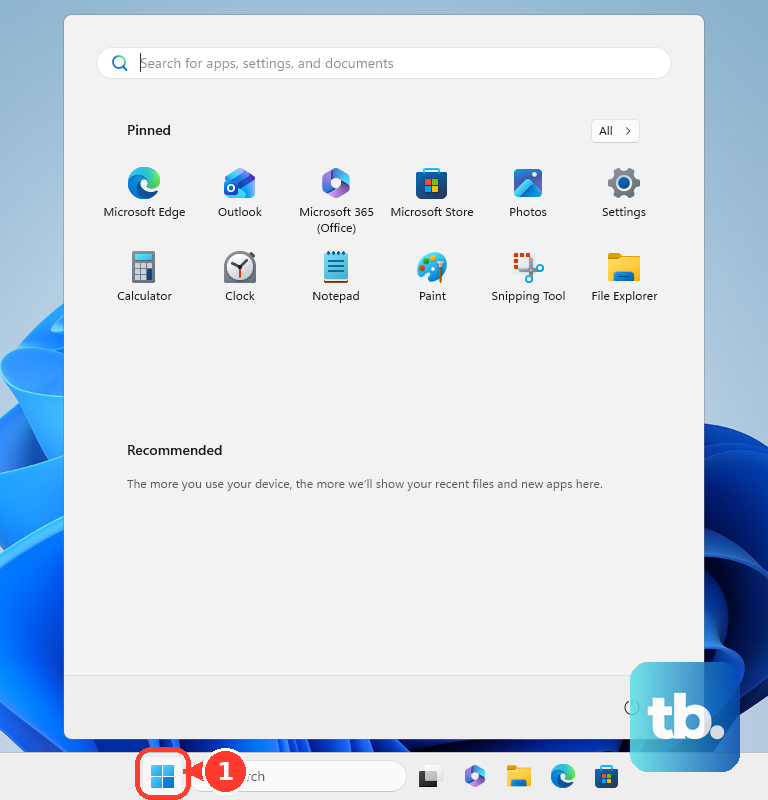
Those steps match the Windows 11 layout. Windows 10 version 22H2 names that page differently: open Start, select Settings, go to Apps, open Apps & features, select Microsoft Edge, then choose Uninstall. That screen has no More icon.
Use the normal Windows uninstall screen first if your PC is eligible. It is the clean consumer route Microsoft documents for removable apps.
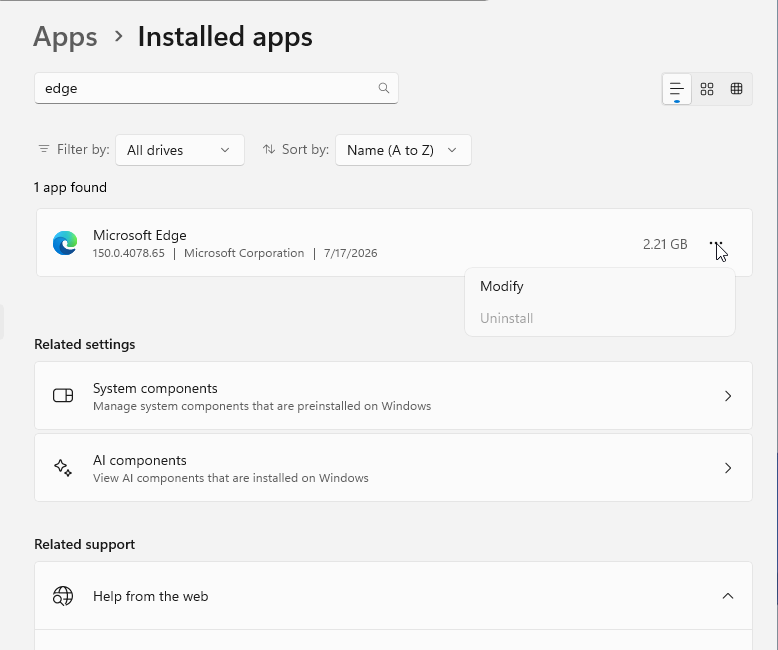
After Edge is removed, Edge-dependent experiences can stop working. Microsoft names PWAs, Copilot, sites installed as apps, widgets, and Windows Search web experiences as affected areas.
3. Try the Start menu shortcut
The Start menu gives you the same kind of uninstall surface with fewer clicks. Open Start, select All apps, find Microsoft Edge, right-click or press and hold Microsoft Edge, then choose Uninstall.
Use it when Microsoft Edge appears as an uninstallable app in the app list. For the built-in Edge Stable browser, this applies to the same EEA-only removal case. It also works for a separately installed Edge channel when Windows exposes that channel as uninstallable.
4. Set Chrome Firefox or another browser as default
Install the browser you want to use. Open Start, select Settings, go to Apps, open Default apps, select your preferred browser, and choose Set default.
That is the Windows 11 flow. For Windows 10 version 22H2, Microsoft still documents the older layout: in Default apps, look under Web browser, select the browser listed there, then pick the browser you want.
For most people in the United States asking how to delete Microsoft Edge, this is the supported answer: Windows keeps the built-in Edge Stable browser, and you move everyday browsing to the browser you actually use. This does not delete Edge. It changes the default browser for normal links and browser tasks.
In the EEA, Microsoft says Set default covers more browser-related link and file types where the selected browser registers for them.
5. Uninstall Edge Beta Dev or Canary separately
Microsoft Edge Beta, Dev, and Canary are Insider channel apps. Removing one of them does not remove the built-in Microsoft Edge Stable browser.
To remove one from Settings, open Start, select Settings, go to Apps, and open Installed apps. Select Microsoft Edge Beta, Microsoft Edge Dev, or Microsoft Edge Canary, select More, then choose Uninstall.
You can also remove an Insider channel from the app list: open Start, select All apps, right-click or press and hold Microsoft Edge Beta, Microsoft Edge Dev, or Microsoft Edge Canary, then choose Uninstall.
6. Ignore old command registry and file deletion fixes
Do not use old Edge removal tricks as current fixes for the built-in Edge Stable browser. That includes elevated command-prompt uninstall commands, NoRemove registry edits, PowerShell package removal scripts, manual folder deletion, and third-party debloat tools.
Microsoft's current support page says Edge is a Windows component that cannot be uninstalled outside supported cases. Microsoft Q&A support also says the old command-line uninstall no longer works and is not recommended.
Reported PowerShell and registry workarounds can leave Edge installed or only expose an uninstall button that does not remove it.
7. Restore Edge from Microsoft
- 1.Go to Download Microsoft Edge.
- 2.Select Download for Windows.
- 3.Run the downloaded installer.
If Edge was removed and you need it again, use Microsoft's official download page. For managed deployments, organizations use Download and deploy Microsoft Edge for Business, then choose Download the latest and Windows.
8. Let IT handle managed PCs
Work and school computers follow device policy. Microsoft documents an Edge Update policy named Specify uninstall behavior for Microsoft Edge for domain-joined managed Windows devices in the EEA, and the policy removes Edge only on devices in the EEA.
If the PC is managed, ask your IT team whether Edge removal is allowed for your region and device. Changing defaults is still done through Start, Settings, Apps, Default apps, your browser, and Set default when policy allows it.
Frequently Asked Questions
Why is there no Uninstall button for Microsoft Edge?
On non-EEA consumer Windows PCs, Microsoft treats the built-in Edge Stable browser as a Windows component and does not provide a supported full uninstall path.
Can I delete Microsoft Edge from Windows 11 in the United States?
No, not through a supported Microsoft consumer path for the built-in Edge Stable browser. Set another browser as the default instead.
Does uninstalling Edge Beta remove the normal Edge browser?
No. Edge Beta, Dev, and Canary are separate Insider channel apps. Removing one of them leaves the built-in Edge Stable browser in place.
What breaks when Microsoft Edge is removed?
Microsoft says PWAs, Copilot, sites installed as apps, widgets, and Windows Search web experiences can stop working when Edge is removed.
Can Microsoft Edge be reinstalled after removal?
Yes. Use Microsoft's official Edge download page and choose the Windows download.