Changing your Facebook last name now runs through Meta's Accounts Center, not the old General Account Settings page. Meta is gradually moving accounts to Meta Accounts, so you may see either Accounts Center or Meta Account settings as the place to manage your settings, and both lead to the same name editor. You can update it from the app, desktop Facebook, or Accounts Center in a browser. If the normal editor will not accept the change, Facebook has a name review form for that.
Change your last name in the Facebook app
Use this when you are in the current Facebook app for iPhone or Android, or when mobile Facebook shows the Accounts Center name editor. Open Facebook and tap Menu. Scroll down and tap Settings & privacy, then tap Settings. Tap Meta Account.
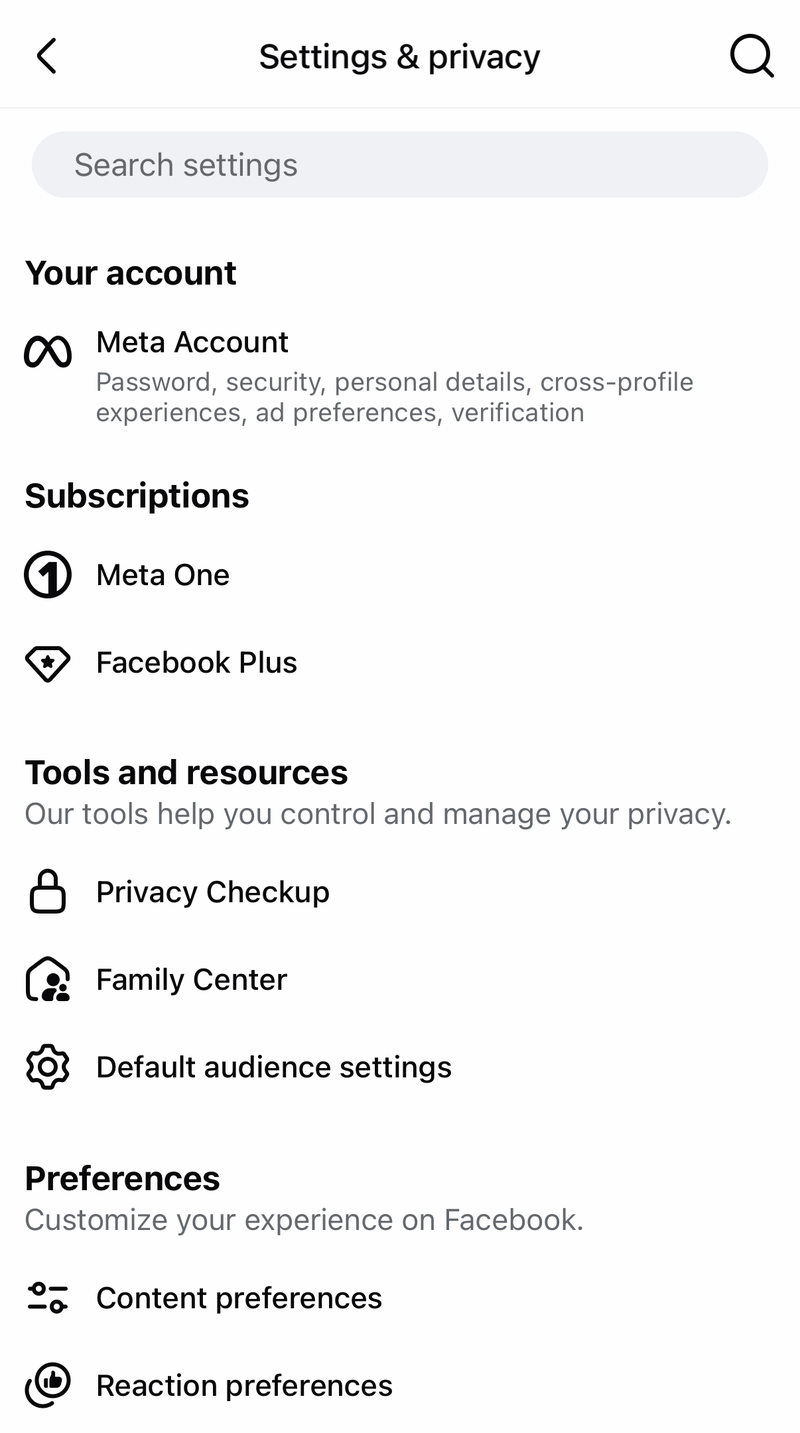
Tap Profiles, then tap your Facebook account. Tap Name.
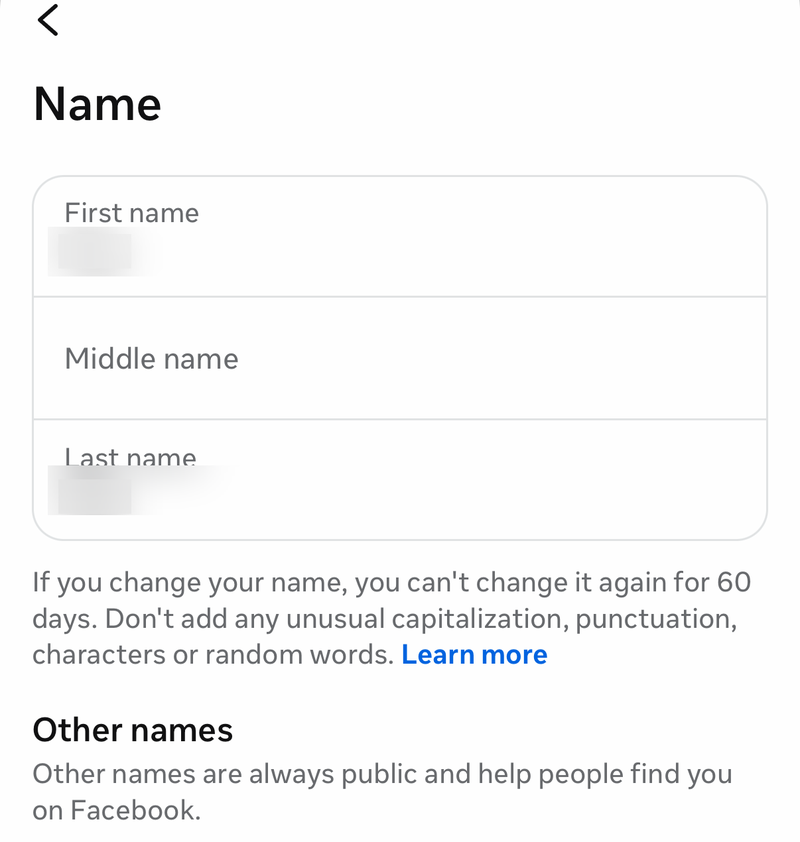
Enter your new first, middle, and last name. Tap Review change. Tap Save changes.
Find Meta Account settings instead
The most common cause is Meta's account settings rollout, where some accounts show Meta Account settings instead of Accounts Center. Open Facebook and go to Menu or your profile picture. Open Settings & privacy, then choose Settings. Open Meta Account settings.
Select Profiles. Select your Facebook account and choose Name. Enter the new last name, then use Review change and Save changes.
Use Facebook on desktop
Click your profile picture in the top right of Facebook. Click Settings & privacy. Click Settings. Click Accounts Center.
Click Profiles. Choose your Facebook account. Click Name. Enter your new first, middle, and last name.
Click Review change, then click Save changes. Check the full name before saving, because this is the primary Facebook profile name editor.
Open Accounts Center directly
Use this when you want to skip Facebook's menus and go straight to the same Meta Accounts Center profile-name editor. It works from a desktop or mobile browser when you can sign in to your Facebook account.
Go to accountscenter.facebook.com/profiles. Sign in if Facebook asks you to. Select your Facebook profile. Select Name.
Enter the new name you want to use. Select Review change. Select Save changes.
Submit a name review request
The most common cause is that the normal Accounts Center name edit cannot be completed, your account is asked to verify the name, or the name needs manual review. Open Facebook's Changing Your Name request form. Enter the first name and last name you want to use.
Upload ID only when Facebook asks for it or when it is needed for review. Provide the requested account or contact information. Submit the form and wait for Facebook to review it.
Request a one-word name
If you use one name instead of a separate first and last name, Facebook sends that request through the Changing Your Name contact form. Enter the name as requested by the form. Provide supporting information when Facebook prompts you for it. Submit the request for Facebook review.
If this method fails, use the standard Accounts Center name editor with a first and last name that Facebook accepts.
Add a maiden name or other surname
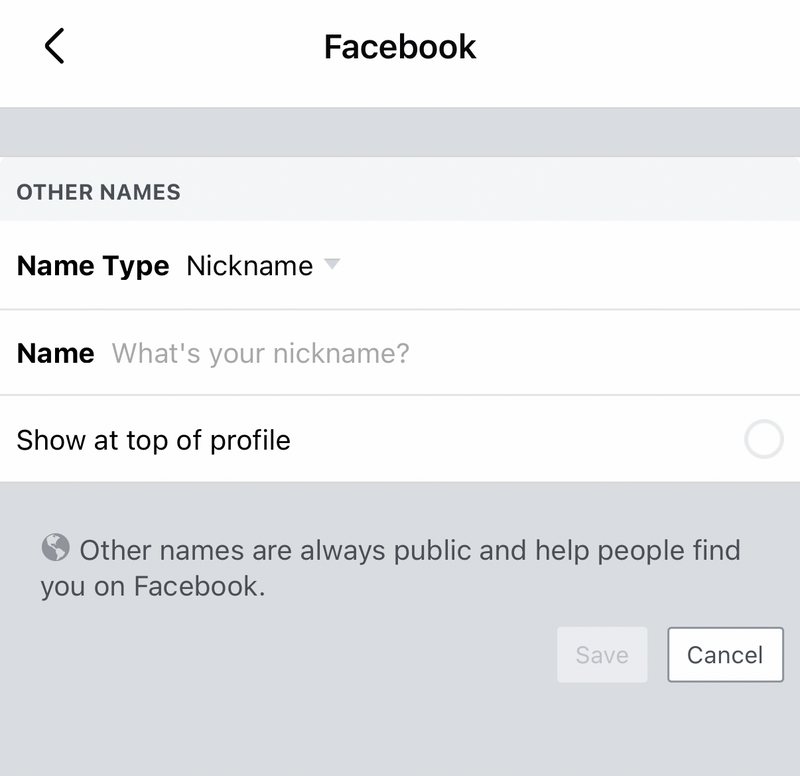
Use an additional name when you want a maiden name, former surname, alternate spelling, or nickname to appear without replacing your primary Facebook last name.
- 1.Open Facebook and tap Menu.
- 2.Tap Settings & privacy, then tap Settings.
- 3.Tap Meta Account, then tap Profiles and choose your account.
- 4.Tap your name, then tap Manage other names below Other names.
- 5.Select the Name type, enter the name, and save it.
Ignore old name-change paths
The most common cause of confusion is that older tutorials still point to screens Facebook no longer uses for its current name-change path.
On desktop, skip General Account Settings, then Name, then Edit. Use Accounts Center, then Profiles, then your Facebook account, then Name.
On mobile, skip Personal and account information, then Name. Use Menu, then Settings & privacy, then Settings, then Meta Account, then Profiles, then your Facebook account, then Name.
Frequently Asked Questions
Can I change only my last name on Facebook?
Use the Name screen in Accounts Center and enter the full first, middle, and last name you want Facebook to use, then review and save it.
Why does my Facebook app show Meta Account settings instead of Accounts Center?
Meta is rolling out account settings changes. If you see Meta Account settings, open it, then go to Profiles, choose your Facebook account, and select Name.
Can I remove my last name from Facebook?
If you use one name instead of a first and last name, submit Facebook's Changing Your Name contact form and provide the requested information for review.
Is a maiden name the same as changing my Facebook last name?
No. Adding a maiden name or other surname under Other names can show an additional name on your profile, but it does not replace your primary Facebook last name.