


Never before has the demand been greater to have fast, cheap, and authentic User-Generated Content (UGC). TikTok, Instagram Reels, YouTube Shorts, product pages, and advertisements require a continuous flow of short-form videos, which are not always cheap or fast to hire creators. It is there that AI video agents are coming in to revolutionize the content creation process. All these new tools go from automatic, scripting to presenting, and provide businesses with a scalable means of on-demand creator-style videos. Vmake is one of the newest and most sophisticated AI UGC generators that have appeared in our time. Let’s review Vmake in detail here…
What Is the Vmake AI Video Agent?
Vmake’s AI Video Agent is an all-in-one tool designed to create realistic UGC-style videos with minimal human input. The platform is a combination of AI scriptwriting, voice generation, scene production, and automatic video editing in a single workflow. Rather than collaborating with creators, brands can create videos using realistic AI avatars, or even commissioned presenters, who were trained using their own videos. Vmake, the creation of a team of marketers, content creators, e-commerce owners, and small businesses, can assist anyone to make professional-quality videos within a few minutes, and they do not need to shoot, visit the studio, or hire actors.
Hands-On Test: Trying Vmake’s AI UGC Video Agent
To understand how well Vmake really performs, I signed up and tested the UGC Video Agent myself. The interface is simple and user-friendly, and one can start creating a video at once. I created the product demonstration in the form of TikTok in my test project, which recommended the following steps. The platform handled everything, scriptwriting, avatar presentation, and scene assembly, surprisingly smoothly.
Steps I took to create a video:
- 1.Signed up for a free account
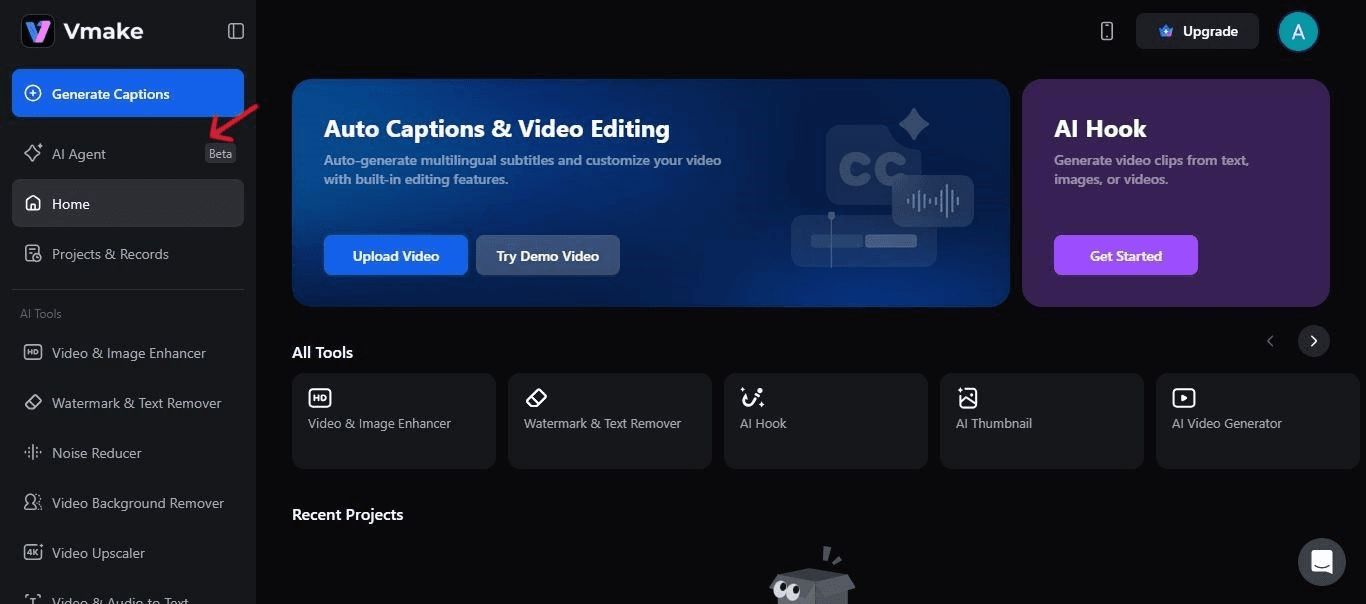
- 2.Selected the UGC Video Agent tool
- 3.
 Click to expand
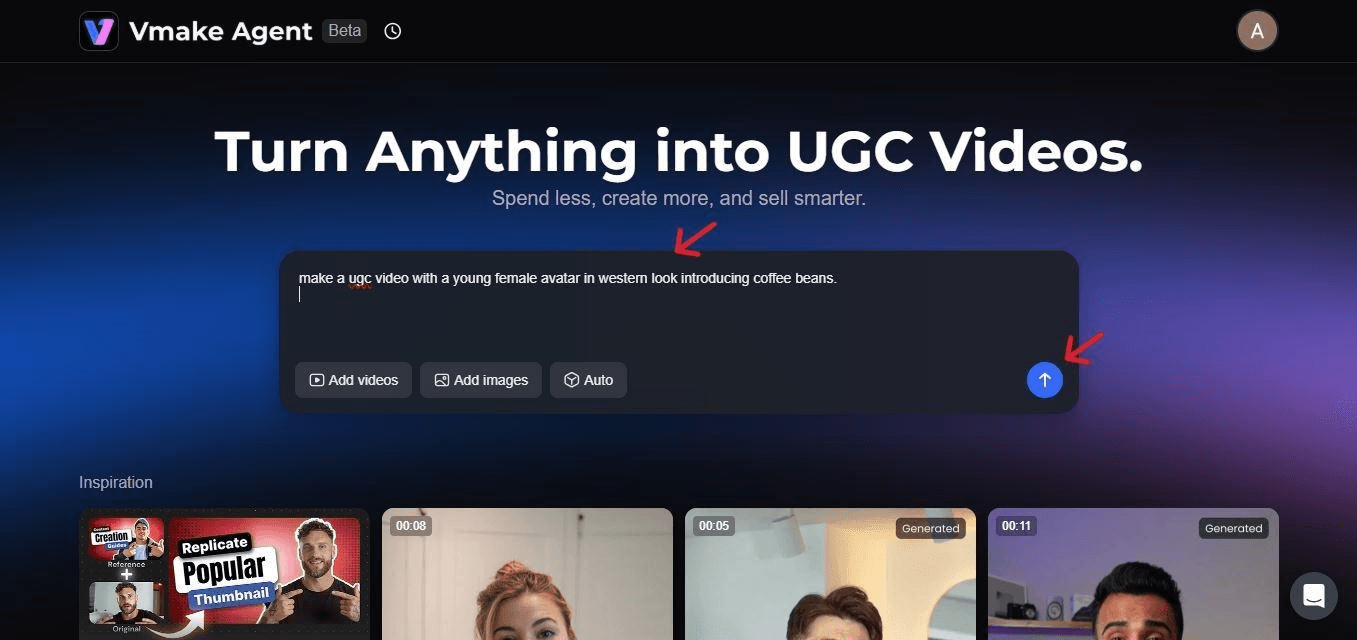
 - 4.Entered a short description or prompt of the video I wanted to showcase
- 5.
 Click to expand
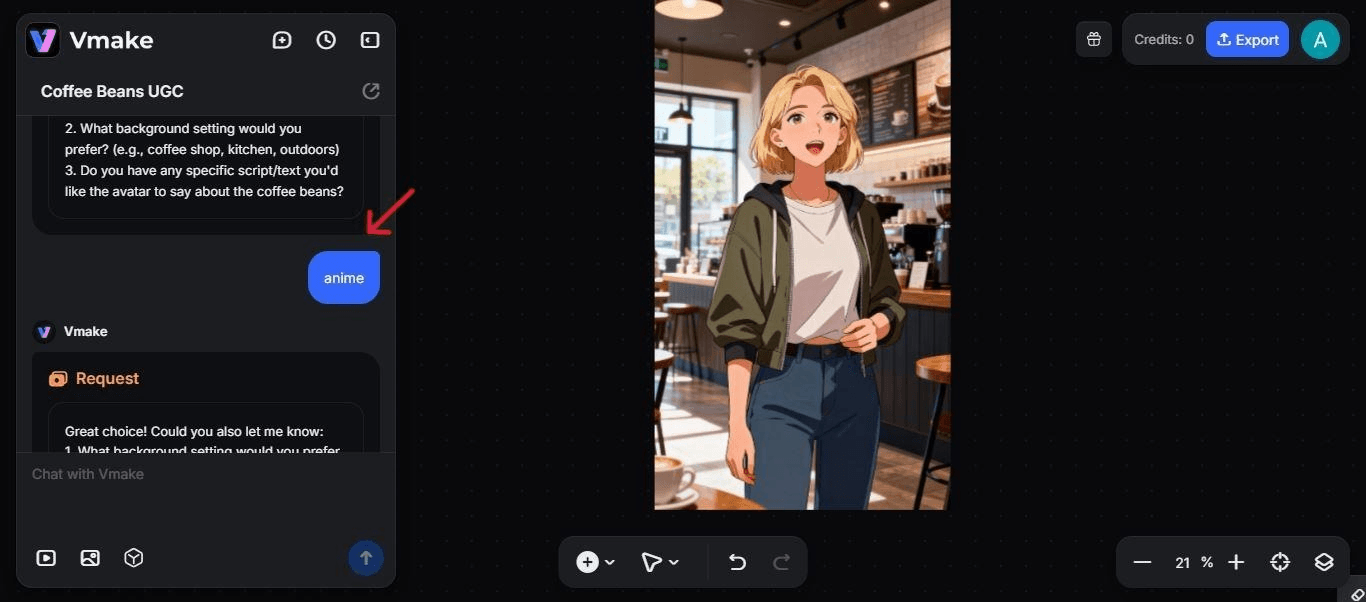
 - 6. Picked a character and voice style for the video.
- 7.
 Click to expand
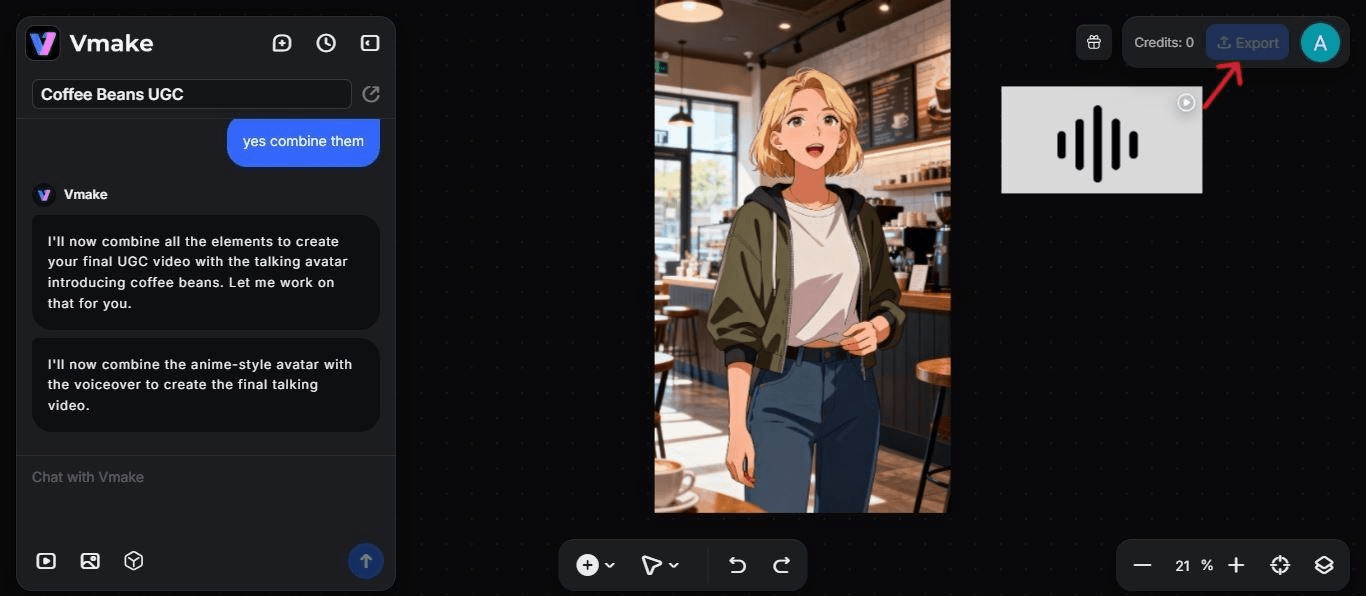
 - 8.Reviewed and edited the auto-generated script, and I downloaded the video by clicking on the export button.
- 9.
 Click to expand
Key Features That Make Vmake a Powerful UGC Creation Tool
Vmake’s strength lies in how many advanced features it packs into one streamlined tool. After testing, several key capabilities stood out:
- AI Avatars & Custom Presenters
Choose from lifelike avatars or train your own presenter so your brand can appear consistently across all videos without filming every time. - Multi-Language Voiceovers
Automatically generate natural, fluent voiceovers in dozens of languages and accents, allowing for global ad variations with zero extra cost. - Script & Scene Generation
Vmake writes full scripts, breaks them into scenes, and aligns visuals with spoken dialogue for a ready-to-publish structure. - Dynamic Facial Expressions & Realistic Movements
Avatars blink, emote, and gesture naturally, making the videos feel more like real creator content instead of stiff AI talking heads. - E-commerce Product Showcasing
Upload product images and Vmake automatically integrates them into the video, perfect for Amazon stores, Shopify brands, and digital product demos.
These features collectively make Vmake one of the most comprehensive AI-powered UGC solutions on the market.
Additional Tools Inside Vmake That Boost Video Production
Beyond the AI Video Agent, Vmake includes several supporting tools that help improve video quality and streamline the editing workflow. These additions make it especially useful for brands that want to polish their content without switching platforms.
Video Watermark Remover
Vmake includes an advanced tool to remove video watermark that cleans up footage without damaging quality. It’s useful for repurposing old assets or removing platform-imposed logos. The feature also aligns naturally with users searching to remove unwanted marks and make their clips look clean and professional.
Video Enhancer
The enhancer tool improves clarity, sharpness, and color accuracy in a single click. It’s particularly helpful when you only have low-resolution product images or UGC clips but still want them to look professional.
Audio Cleaner
This tool removes background noise, hissing, and echo, producing crisp narration and clearer speech. It's ideal for businesses that still combine AI-generated content with live-recorded audio.
Background Removal
Vmake has a super powerful video background remover that instantly isolates your subject and replaces distracting scenes with clean or studio-style backdrops.The tool is valuable for product videos, social content and tutorials where visual consistency matters.
Why AI-Generated UGC Matters for Brands in 2025
AI-generated UGC has become a major trend for marketing teams looking to scale video content fast. Here’s why it matters:
- Faster production
Brands can go from idea to final video in minutes, not weeks. - Cheaper than hiring actors
AI avatars eliminate the need for creator fees, studio time, and reshoots. - Consistent brand voice
Scripts, tone, and presenters stay uniform across channels and campaigns. - On-demand variations for A/B testing
Quickly generate multiple versions of a video to test hooks, captions, and languages. - Increased social media velocity
Produce enough content to stay competitive on fast-paced platforms like TikTok and Instagram. - Great for short-form formats and ads
Works perfectly for reels, shorts, product reviews, explainer videos, Amazon listings, and paid ads.
As AI tools continue to improve, these benefits make UGC generation not just convenient but a crucial strategic advantage.
Final Verdict: Is Vmake Worth Trying for UGC Production?
Having tried the Vmake AI Video Agent in real life, it is obvious that the platform provides one of the most effective methods of generating high-quality UGC in large quantities. Its combination of AI scripting, avatars, editing, and enhancement tools combines to make it a viable one-stop solution to marketers and small businesses.
In case you need regular video content without the recruitment of creators, then Vmake is certainly worth a test run. It is a safe of time, less expensive in production, and gives unexpectedly realistic outcomes, which makes it a strong tool for contemporary brands.